An in-depth comparison of self-hosted identity providers: Dex, Authelia, Curity and Keycloak
Sunday 05 July 2026 · 55 mins read · Viewed 142 timesTable of contents 🔗
Introduction 🔗
Over the past few years I've worked with many identity providers. I thought it would be useful to provide an in-depth comparison, since they differ significantly yet aim to achieve the same goal: identity and authentication.
These providers differ primarily in their OAuth2 capabilities and extensibility. Some offer multi-tenancy/profile/realm capabilities, while others rely solely on LDAP.
Criteria of comparison 🔗
Based on my R&D at work and at home, here are the criteria I used:
- Deployment
- Architecture (standalone, distributed, controller-workers, etc.)
- High availability
- Load balancing
- Configuration
- Configuration management (declarative, GitOps, etc.)
- OAuth2 clients
- Capabilities (client credentials, PKCE, etc.)
- Logout (front-channel, back-channel, etc.)
- Scopes
- JWT, access tokens, refresh tokens
- OIDC (ID token, userinfo, introspection, discovery document, revocation, etc.)
- User management
- Database and federation
- Credentials storage (hash algorithms, etc.)
- Admin UI
- Admin API
- Authentication
- Flows
- Actions/steps and MFA
- Policies and defenses (brute-force, password policies, etc.)
- Miscellaneous (email as username, forwarded authentication, etc.)
- Identity providers
- OIDC
- SAML2
- Others (GitHub, etc.)
- Maintenance
- Audits & Events
- Metrics & Logs
- Backup & Restore
- Documentation
- SDK Availability, Open source & licensing
- Vulnerability disclosure
- User guide
- API reference
- Extensibility
- Theming & Customization
- Custom flows
- Custom steps (scripts)
- Custom mappers/scopes
- APIs
There are, of course, additional criteria depending on your use case, but for my needs I chose an identity provider based on the criteria above.
A quick comparison 🔗
Before we start the in-depth comparison, here's a quick look at the identity providers I plan to compare.
| Name | Age as of 2026 | Complexity | License |
|---|---|---|---|
| Dex | 10y | Low | Apache-2.0 |
| Authelia | 10y | Medium | Apache-2.0 |
| Curity | ~11y | High | Proprietary |
| Keycloak | 13y | High | Apache-2.0 |
It's worth noting that the OAuth2 standard is 14 years old and OIDC is 12 years old. Keycloak adapted to the OIDC standard during its development.
In-depth comparison 🔗
Deployment 🔗
Dex & Authelia 🔗
Dex and Authelia share a similar deployment architecture. They both focus on stateless deployments, delegating persistence to an external database. They can:
- Use a static user-password database stored in a file.
- Delegate session/cache storage to a key-value database (Redis for Authelia, etcd/Kubernetes/SQL for Dex).
- Use LDAP as a user-password database.
This deployment architecture is a common, sound approach and avoids many weaknesses thanks to service replicability. One remaining weakness is the user-password database itself. But, this is common to all identity providers.
One notable limitation of Authelia is that its configuration is static. For example, it lacks dynamic client registration and APIs to manage configuration.
Dex does not have this limitation and provides an API to manage configuration, although it's largely limited to configuring OAuth2 clients.
In summary, Dex and Authelia are naturally highly available thanks to their
stateless design. You'd deploy them using a Kubernetes Deployment.
Curity 🔗
Curity uses a controller-worker architecture: the controller is the "admin" node, and the workers are the "runtime" nodes.
Curity can use a local database, although a remote database is preferred. It supports many databases via JDBC, and also supports LDAP, SCIM, DynamoDB, and MongoDB.
The cache can be stored in the remote database (depending on its capabilities) or distributed across the workers. In other words, Curity is topology-aware and stateful.
Note that the configuration database is stored locally and uses
com.tailf.cdb.
Curity has a major weakness: the configuration database is stored locally, and the controller is a single node with no automatic failover or election. If the configuration database becomes corrupted, the entire cluster can go down.
Curity offers a GitOps-based deployment mode that eliminates the need for the local configuration database. However, if you use the Curity Admin API to dynamically configure the cluster, the single controller remains a potential single point of failure.
In summary, Curity is not highly available, but does allow some load
balancing. Its topology-awareness simplifies cache deployment. The overall
deployment is complex: you need the controller (typically a single-replica
Kubernetes StatefulSet with a Recreate update strategy, and a persistent
volume) and the workers (a Kubernetes Deployment) deployed separately.
Keycloak 🔗
Keycloak is as stateless as Dex and Authelia, but it is also topology-aware. Specifically, it has multiple levels of caching:
- A distributed local cache (powered by Infinispan).
- An optional but recommended distributed remote cache (also Infinispan).
- The remote database (MySQL, Oracle, MSSQL, or Postgres).
Infinispan is not just a simple cache. You can configure different caching strategies:
- Distributed: Infinispan will distribute to X nodes.
- Replicated: Infinispan will distribute all nodes.
- Local: Infinispan will only a single node (which doesn't make any sense, so, no one will use it).
- And more... (see the documentation)
In summary, Keycloak is highly available thanks to its stateless design.
Compared to Dex and Authelia, Keycloak is slightly more complex to deploy due
to its topology-awareness; you'll typically need stable identities (for
example, a StatefulSet in Kubernetes).
Configuration 🔗
Configuration management 🔗
Dex and Authelia are configured before the deployment, through a file.
Curity and Keycloak can also be configured before the deployment, also through a file, using the import feature. But, only Curity supports a merging strategy.
Curity and Keycloak offers dynamic configuration via the Admin API. Curity uses a standard RESTCONF API, while Keycloak uses a REST API, documented through OpenAPI.
However, thanks to the community, Keycloak can be configured with Terraform and Ansible.
In conclusion, all four of them can be configured using GitOps:
- Dex, Authelia, and Curity through files.
- Keycloak through Terraform or Ansible.
OAuth2 clients 🔗
Grant types 🔗
| Grant type | Dex | Authelia | Curity | Keycloak |
|---|---|---|---|---|
| Authorization Code/Standard (RFC 6749 4.1) (+ PKCE (RFC 7636)) | Yes | Yes | Yes | Yes |
| Implicit Code (deprecated) (RFC 6749 4.2) | Yes | Yes | Yes | Yes |
| Hybrid Flow (OIDC Core 1.0 3.3) | Yes | Yes | Yes | Yes |
| Refresh Token (RFC 6749 1.5) | Yes | Yes | Yes | Yes |
| Client Credentials/Service Accounts (RFC 6749 4.4) | Yes | Yes | Yes | Yes |
| Client Credentials with JWT Assertion (RFC 7523 2.2) | No | No | Yes | Yes |
| Device Code (RFC 8628) | Yes | Yes | Yes | Yes |
| Password/ROPC/Direct Access (deprecated) (RFC 6749 4.3) | Yes | Yes | Yes | Yes |
| Token Exchange (RFC 8693) | Yes | No | Yes | Yes |
| JWT Authorization Grant (RFC 7523 2.1) | No | No | Yes | Yes |
If you're not familiar with these grant types, here's a quick summary:
- Machine-to-human (requires human interaction such as 2FA and entering a password):
- Authorization code flow: the standard flow used by end users with a login page. Implicit and Hybrid are variants of the authorization code flow.
- Refresh token: used to refresh an access token via a refresh token; a way to manage end-user sessions.
- Device code: used when an application lacks a proper login UI and delegates the code exchange to a browser.
- Machine-to-machine:
- Client credentials (+ JWT assertion): user-password authentication between machines. A JWT assertion is a signed payload used in addition to client credentials.
- Token exchange: exchanges a token for another (for example, to change scopes).
- JWT Authorization Grant: a signed payload is sent and often mapped into
the access token (for example, mapping the
subfield for impersonation).
In summary, only Curity and Keycloak can handle signed payloads. (Keycloak recently added support for the JWT Authorization Grant.)
Logout 🔗
| Capability | Dex | Authelia | Curity | Keycloak |
|---|---|---|---|---|
| RP-initiated logout | No | No | Yes | Yes |
| IdP-initiated logout (SAML2) as IdP | No | No | Yes | Yes |
| IdP-initiated logout (SAML2) as SP | No | No | No | Yes |
| Front-channel logout | No | No | Yes | Yes |
| Back-channel logout | No | No | Yes | Yes |
If you're not familiar with these logout types, here's a quick summary:
- RP-initiated logout: the standard way for a user to end an application's session (the logout button).
- IdP-initiated logout: the identity provider ends a session for an application (for example, a portal forcing the application to revoke the session).
- Front-channel logout: all applications where the user is logged in are logged out simultaneously using a browser mechanism such as an iframe.
- Back-channel logout: all applications where the user is logged in are
logged out simultaneously using a server-side request.
- As SP: the service provider receives a logout request from an upstream identity provider.
- As IdP: the identity provider sends the logout request to a downstream service provider.
In summary, Dex and Authelia lack a critical feature to end sessions: there
is no end_session_endpoint in their OIDC configuration. Keycloak is the only
one that properly supports IdP-initiated logout (see the dedicated identity
provider chapter). This feature is not always critical, but it is useful.
JWT, Access Tokens and Refresh tokens 🔗
| Feature | Dex | Authelia | Curity | Keycloak |
|---|---|---|---|---|
| Configure token lifetime (access & refresh) | Yes | Yes | Yes | Yes |
| Controlled rolling/rotation lifespan (absolute refresh) | Yes | No | Yes | Yes |
| External JWKS handling allowed | No | Yes | Yes | Yes |
| Internal JWKS endpoint | Yes | Yes | Yes | Yes |
| Automatic JWT signer generator (no admin interaction) | Yes | No | No | Yes |
| Admin can configure JWT signer | No | Yes | Yes | Yes |
In my experience, the missing features are not critical for standard usage. However, Keycloak is the easiest to manage, concerning the JWT life-cycle.
OIDC additional capabilities 🔗
| Capability | Dex | Authelia | Curity | Keycloak |
|---|---|---|---|---|
| UserInfo Endpoint | Yes | Yes | Yes | Yes |
| Discovery Document | Yes | Yes | Yes | Yes |
| Token Introspection (RFC 7662) | No | Yes | Yes | Yes |
| Token Introspection with JWT output (deopaque) (non-standard) | No | No | Yes | Yes |
| Token Revocation (RFC 7009) | No | Yes | Yes | Yes |
In summary, Dex is unsuitable if you plan to use it with a token manager.
I've used Curity and Keycloak with opaque tokens and used introspection to de-opaque them. Because this is non-standard, I wouldn't recommend introspection for opaque tokens. Keycloak recommends using the Token Exchange grant to upgrade an opaque token.
User management 🔗
| Feature | Dex | Authelia | Curity | Keycloak |
|---|---|---|---|---|
| Can create user | No | No | Yes | Yes |
| Manage user over API | No | No | GraphQL API behind paywall. Only via SCIM API |
Yes via REST API also via SCIM (extension) |
| Manage user over UI | No | No | No | Yes |
| LDAP sync/Federation | LDAP Read only | No | As primary DB | Yes |
| Supported credentials hashing algorithms | Bcrypt | Argon2, Scrypt/Yescrypt, PBKDF2, SAH2, Bcrypt | Argon2, Bcrypt, PBKDF2, Scrypt, SSHA, MD5 | Argon2, PBKDF2 |
As you can see, Dex and Authelia are limited. The recommendation is to use LDAP for user management. That approach is not ideal for self-registration but works for internal identity providers.
Keycloak is the most convenient for user management. It supports fewer credential hashing algorithms out of the box, which can complicate migrations. However, Keycloak supports extensions (including credential providers) to add support for more hashing algorithms.
Authentication flows 🔗
Dex & Authelia 🔗
Their flows are not customizable.
Curity 🔗
Curity provides multiple authenticators, but many are behind a paywall. In the free offering you may only have Google (OIDC) and username-password authenticators.
Curity does not provide SAML2 and full OIDC support in the community edition.
Curity supports:
- Pre-login steps
- Pre-registration steps
- Post-login steps
- SSO (user already connected) steps
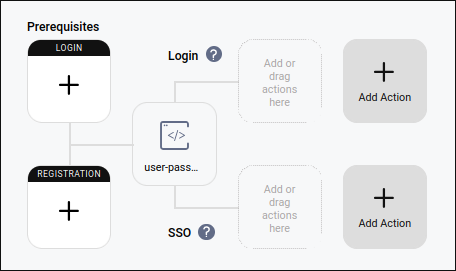
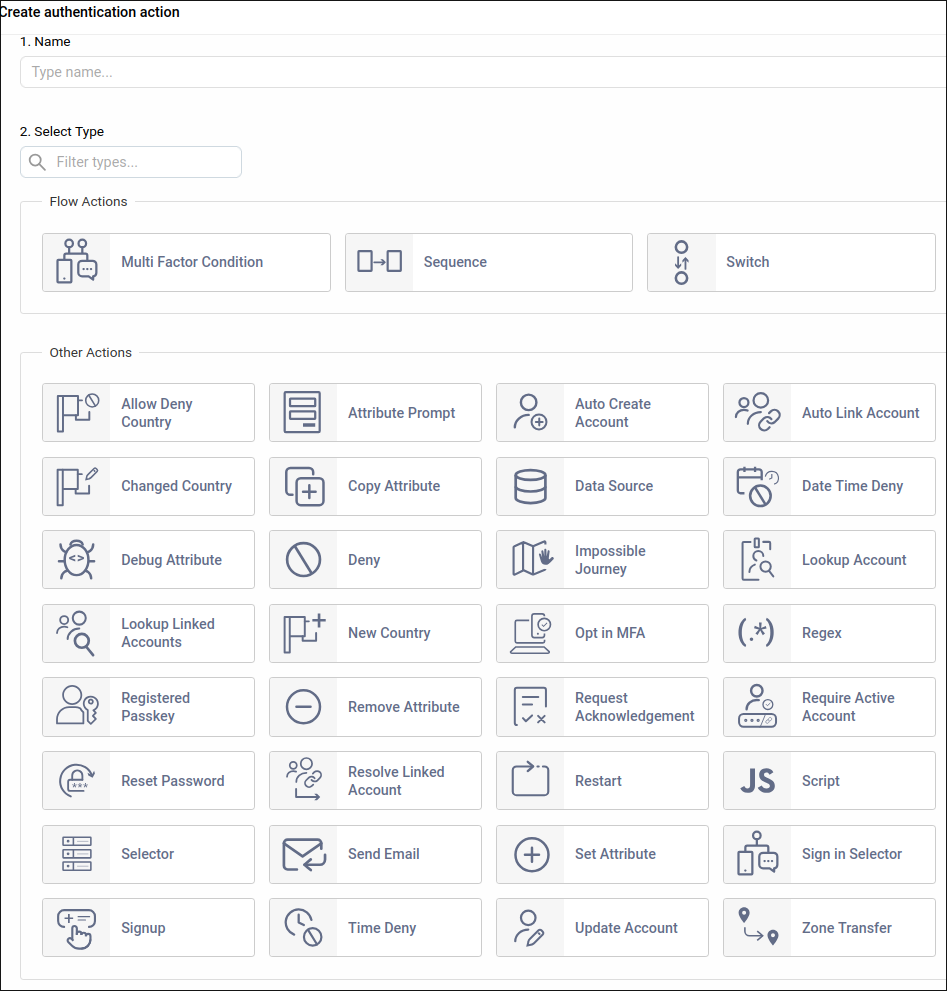
Curity offers quite a lot of type of steps, including custom scripts:
However, Curity lacks a comprehensive user profile UI, which makes managing features like 2FA more awkward.
As a result, much user-side management happens during the authentication flow.
Second-factor methods such as SMS and TOTP are treated similarly to the primary authenticator:
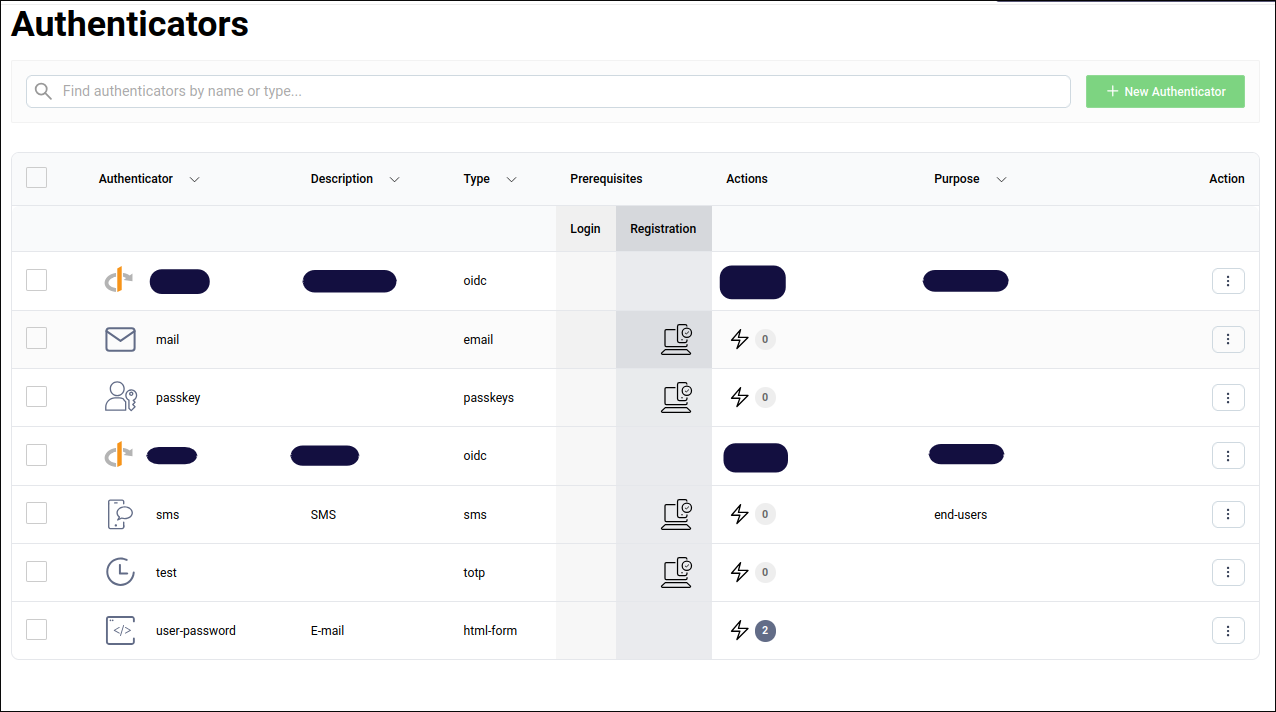
When you invoke the "user-password" authenticator, you must "jump" to the second authenticator (for example via an "Opt-in MFA" step) to trigger a second factor.
It makes sense conceptually: SMS, password, email, and TOTP are all "factors" for authentication... but the lack of a user profile page complicates the experience.
In summary, Curity flows are powerful and customizable, but the missing user profile and the absence of many standard authenticators in the community edition limit its suitability for self-hosted home use.
Keycloak 🔗
Oooh boy, it's time.
Let's start first with this: Keycloak has multiple roles that can be assigned to an authentication flow:
- Browser flow
- The typical flow with a login form. We'll see more details below.
- Registration flow
- The self-registration form used to register a new user.
- Direct grant flow
- Used by OAuth2 clients with the direct grant type. Username-password validation with optional 2FA.
- Reset credentials flow
- The password reset form.
- Client authentication flow
- Client credentials/service accounts flow: client ID and secret, signed JWTs, etc.
- First broker login flow
- After the first login on an identity provider (a broker), this flow is executed to link the internal Keycloak user to the external identity provider user.
- Post-login flow (assignable in the identity provider panel settings)
In a flow, there are:
- Executions: scripts that are executed during the flow. Executions can have two types:
- Step: A script that is executed.
- Condition: A logical condition that is evaluated for "Conditional" sub-flows.
- Sub-flows: A list of sub-flows or executions.
- Requirement states of the executions or sub-flows.
- Required: All executions and sub-flows marked as "Required" within the sub-flow must succeed.
- Alternative: At least one of the executions or sub-flows marked as "Alternative"
within that flow must succeed. If one succeeds, the rest are skipped.
- Setting "Required" in an "Alternative" sub-flow will cause the "Alternative" elements to be ignored. You shouldn't use any "Required" elements in an "Alternative" sub-flow.
- Disabled: The execution or sub-flow is skipped.
- Conditional (only for sub-flows): If all "condition" executions within the flow evaluate to "true", the sub-flow is executed as Required. Otherwise, the sub-flow is Disabled.
These rules can be quite confusing, so here's a simplified explanation:
- Alternative executions and sub-flows:
- At the same level they can only be used with other Alternative (and Disabled) executions or sub-flows. (Required "condition" executions can be used if the whole flow is Conditional.)
- At the same level, only one Alternative execution or sub-flow must succeed for the whole flow to succeed.
- Required and Disabled executions and sub-flows:
- At the same level, all Required executions and sub-flows must succeed for the flow to succeed.
- Conditional sub-flows:
- Act as Required (i.e., the flow is enabled) only if all "condition" executions within the sub-flow evaluate to "true". Otherwise, the sub-flow is Disabled.
Here's an example: the classic "browser" flow used to log in as an end user:
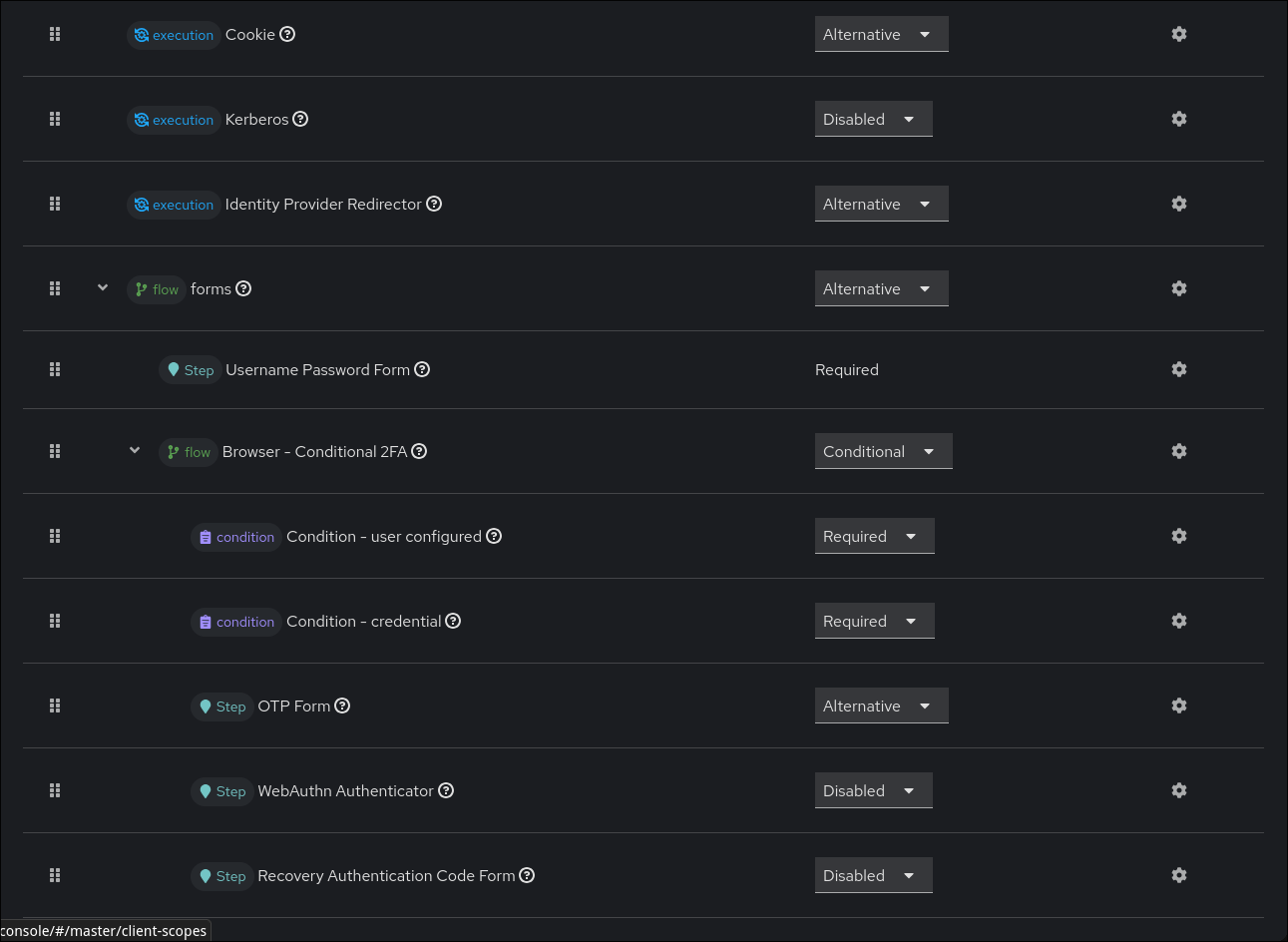
- The first level is the flow itself. There are only "Alternative"
executions or sub-flows.
- Cookie:
- Execution: If there is a valid SSO cookie, the execution succeeds.
- Alternative: On success the whole flow succeeds, and the user is redirected to the callback URI.
- Kerberos:
- Execution: Initiates SPNEGO authentication.
- Disabled: Kerberos is disabled.
- Identity Provider Redirector:
- Execution: If
kc_idp_hint=<idp alias>is set as a query parameter during the login flow, the user is redirected to the specified identity provider and the execution succeeds. - Alternative: On success the whole flow succeeds, and the user is redirected to the callback URI.
- Execution: If
- Forms sub-flow:
- Alternative: On success, the whole flow succeeds, and the user is redirected to the callback URI.
- Username Password Form:
- Execution: The user is presented with a username-password form. The execution succeeds when the user successfully authenticates.
- Required: On success the next execution is checked.
- Browser - Conditional 2FA sub-flow:
- Conditional: The sub-flow becomes Required if the condition executions evaluate to "true".
- Condition - user configured:
- Execution: Returns "true" if the user is properly configured (valid email, valid first name, etc.).
- Condition - credential:
- Execution: Returns "true" if the user has a valid credential in the authentication flow.
- OTP Form:
- Execution: The user is presented with an OTP form. The execution succeeds when the user successfully authenticates.
- Alternative: On success the whole flow succeeds.
- WebAuthn Authenticator:
- Execution: The user is presented with a WebAuthn form and the execution succeeds on successful authentication.
- Disabled: WebAuthn is disabled. To enable it, mark it as Alternative.
- Recovery Codes Form:
- Execution: The user is presented with a recovery codes form. The execution succeeds on successful authentication.
- Disabled: Recovery codes are disabled. To enable them, mark the execution as Alternative.
- Cookie:
The Keycloak flow system is mature, but the usage of requirement states can be ambiguous.
Summary 🔗
- Dex & Authelia: No customization.
- Curity: Has only one customizable flow and shows limitations due to the software's restrictions.
- Keycloak: Has multiple customizable flows per use case. It's complex, but offers significant advantages once mastered.
Miscellaneous authentication settings 🔗
| Feature | Dex | Authelia | Curity Identity Server | Keycloak |
|---|---|---|---|---|
| Brute force protection | No | Yes | Yes | Yes |
| Password policies | Not applicable | Not applicable | Yes | Yes |
| Password blacklist | Not applicable | Not applicable | Yes | Yes |
| Email as username | Not applicable | Not applicable | Yes | Yes |
| Self registration | Not applicable | Not applicable | Yes | Yes |
| Email verification | Not applicable | Not applicable | Yes | Yes |
| Multi-tenancy/profile | No | No | Yes | Yes |
| User profile management | Not applicable | Yes (for 2FA) | No | Yes |
| ForwardAuth support (No = needs oauth2-proxy) | No | Yes but non-configurable response headers | No | No |
| Session management | No | No | No | Yes |
Identity providers support and settings 🔗
Identity providers support
| Identity Provider / Connection | Dex | Authelia | Curity | Keycloak |
|---|---|---|---|---|
| Generic OIDC | Yes | Yes | Commercial | Yes |
| Generic SAML 2.0 | Yes | No | Commercial | Yes |
| Yes | Yes | Commercial | Yes | |
| Yes | Yes | Yes | Yes | |
| Microsoft / Entra ID | Yes | Yes | Commercial | Yes |
| LDAP / Active Directory | Yes | Yes | Commercial | Yes |
| GitHub | Yes | No | Commercial | Yes |
| No | No | Commercial | Yes | |
| No | No | Commercial | Yes |
Keycloak is the only one that supports everything. Dex supports many providers but lacks some social identity providers. Authelia supports only standard OIDC identity providers.
Curity is the worst in this regard, with many features behind a paywall.
Identity providers settings
Only Curity and Keycloak can map inbound attributes to other attributes.
Maintenance 🔗
| Feature / Operation | Dex | Authelia | Curity | Keycloak |
|---|---|---|---|---|
| Audit logs | No | No | Yes | Yes |
| Structured logging | Yes | Yes | Yes | Yes |
| Events system | No | No | Yes | Yes |
| Metrics | Yes | Yes | Yes | Yes |
| Configuration backup | Not applicable | Not applicable | Yes | Yes |
| User data backup | Not applicable | Upstream backup | Upstream backup | Upstream backup |
As expected, heavy software has proper maintenance tooling for long-term operations.
Documentation 🔗
| Documentation / Legal Category | Dex | Authelia | Curity | Keycloak |
|---|---|---|---|---|
| Open Source | Yes | Yes | No | Yes |
| Vulnerability Disclosure (CVD) | Yes | Yes | No | Yes |
| User Guide Quality | Minimal | Comprehensive | Comprehensive | Use-case driven |
| API Reference (for API users) | No | Not applicable | GraphQL schema, SCIM standard, RESTCONF standard | Ambiguous OpenAPI spec |
| API Reference (for developers) | No | No | Partial | No, but open source and Java standard |
Because Curity is closed source, its documentation is exceptional and detailed. Its use of standards for APIs helps API users interact with and configure the system.
However, Curity does not sufficiently document the APIs used for scripting. Keycloak's API documentation is lacking in places, but its open source nature allows you to inspect the source code to find the interfaces.
Dex and Authelia focus their documentation on administration and configuration rather than extensibility.
Extensibility 🔗
Regarding extensibility, Keycloak and Curity are the only ones that support:
- Custom flows
- Custom steps
- Theming and customization (including localizations and emails)
- A management API
- Custom mappers and scopes
Dex lacks these features, and Authelia only supports custom claims (with limitations).
Conclusion 🔗
If you've read my in-depth comparison, you should be able to draw your own conclusions. If you want a summary of this comparison, here it is:
- Dex shows its ability to connect to multiple upstream identity providers, while being lightweight and stateless. However, it lacks in everything else: security, extensibility, documentation, etc. It's a great choice for development or quick OIDC connectivity, but less suitable for production in many cases.
- Authelia shines by trying to strictly follow the OIDC and LDAP standards. The project still misses some OIDC features, and has no self-registration, which limits enterprise or customer- facing use. However, it is well suited to self-hosted home environments and can be a good long-term at-home solution.
- Curity is similar to Keycloak, but everything worse: it's not open source, it has availability issues, security issues, extensibility documentation issues, etc. It is also too expensive for a self-hosted environment.
- Keycloak is the most feature-complete option. If it lacks something, you can extend it. It's secure, extensible, open source, and battle-tested in multi-AZ, multi-tenant enterprise environments.
This comparison is based on my experience in production and home environments.
Considering the criteria above, I believe Keycloak is the best free, open-source, self-hostable identity provider available today. If you have a powerful server, choose Keycloak. Otherwise, consider Authelia (or possibly Kanidm, although Kanidm's HA is challenging).
I would not recommend Dex for production, and I do not recommend Curity for self-hosting. There is little reason to pay for Curity when Keycloak is free and open source.
Even if you consider paying for Curity support and ease of use, I would still recommend Keycloak.