Deploying CrowdSec to ban them all.
Friday 28 November 2025 · 2 hours 18 mins read · Viewed 1.6k timesTable of contents 🔗
Introduction 🔗
Usually, I don't write step-by-step guide on how to deploy things, but in this case, I will. In these times, it's almost impossible to open an HTTP port without getting spammed and attacked by botnets and other malicious actors.
One solution is the close the port and forward the traffic to a better, managed WAF (Web Application Firewall) by using Cloudflare Tunnel, delegating the security to Cloudflare.
However, adopting such a solution introduces a significant dependency on a centralized "lord" of the internet, compromising full infrastructure independence.
While absolute independence is debatable, given the necessity of root DNS for domain registration and Certificate Authorities for SSL, relying on a platform like Cloudflare presents a unique single point of failure. Unlike the decentralized nature of DNS and certificate management, Cloudflare's centralization means its outages directly translate to your downtime. In fact, a major outage at Cloudflare last week demonstrated exactly this vulnerability.
This article explores an alternative path: preserving your infrastructure's autonomy while effectively securing your network from attacks. We will demonstrate how to achieve robust protection using CrowdSec, maintaining control and independence without using centralized services.
Why would I publish a port on the home network ? 🔗
While the best practice is to use cloud providers to expose your service and avoid leaking your IP address, leveraging a home network connection offers distinct, often overlooked, advantages for certain projects:
- You're likely to get less attacked by bots, since ISP assigned IP addresses are typically less targeted by bots compared to IPs assigned by cloud providers.
- Your home IP address is less likely to be pre-emptively blocked or flagged due to the unrelated, malicious activities often hosted on shared cloud infrastructure.
- For users with high-quality fiber connections, hosting directly can offer surprisingly low latency, potentially rivaling or even surpassing the performance of services routed through distant cloud nodes or additional tunneling layers.
- Using a robust reverse proxy directly behind the public HTTP port ensures that most common web attacks are filtered before they ever reach your backend applications.
The major drawback is the exposure of your physical location, as your ISP-assigned IP address can be linked to your geographic data. Therefore, this approach is not suitable for professional or high-stakes services where anonymity and guaranteed uptime are critical.
However, for personal projects, small community sites, or low-stakes experiments, hosting on a home network offers a cost-effective, high-performing alternative that retains independence from large-scale cloud ecosystems.
How to protect against attacks and spammers ? 🔗
A traditional solution against malicious traffic and brute-force attacks involves analyzing system logs to identify and block offenders. Tools like Fail2ban have long been the standard for this, parsing logs for failed login attempts and temporarily banning the source IP address.
However, Fail2ban suffers from a critical limitation: the reaction time. Since bans are applied only after the logs are written, read, and processed, there is an inherent delay. The malicious actor has already made several attempts before the block takes effect.
CrowdSec solves this issue in multiple manners:
- CrowdSec uses and builds a crowdsourced blocklist to block known attackers, allowing you to proactively block threats before they ever interact with your systems.
- Like Fail2ban, CrowdSec parses logs in real time, but it simplifies deployment by offering an extensive library of community-validated configurations (or "scenarios") designed to recognize and handle common attack patterns.
- Beyond simple spam or brute-force attempts, CrowdSec uses its log analysis to identify complex attack scenarios. This includes recognizing the initial stages of large-scale threats like Distributed Denial of Service (DDoS) attempts or application-specific attacks such as SQL injection.
- For defense against attacks aimed at your web applications, CrowdSec offers a WAF component. This intercepts and inspects HTTP requests before they reach your reverse proxy or backend services, providing a critical layer of preventative security.
How to deploy CrowdSec 🔗
This article is about deploying a distributed setup of CrowdSec on Kubernetes and protect against Web Application attacks. It can also handle SSH and many other types of attacks, but this won't be the focus of this article.
Architecture 🔗
Here are the components that play a role in this setup:
- The persistence: Which is either SQLite on disk or a PostgreSQL instance (or any other database supported by CrowdSec). This is used to persist the state of CrowdSec Local API.
- The CrowdSec Local API:
- Stores Alerts and Decisions to the database.
- Is used to manage decisions, alerts, blocklists, and more.
- The CrowdSec Agent (log processor): It's a daemon used to read logs, whether it's from files or from a log storage like Loki, Elasticsearch, etc.
- The CrowdSec AppSec: It's a daemon that looks like the CrowdSec Agent, with the difference of having an open port for the reverse proxy to send traffic to it and inspect it.
- The reverse proxy (remediation component): Which will forward traffic to the AppSec component of CrowdSec, which will then inspect the traffic and block any malicious traffic. The reverse proxy logs will also be used to identify additional patterns of attacks.
- The CrowdSec Central API: This is used for metrics on crowdsec.net and contributing to the CrowdSec Community blocklist.
CrowdSec pricing plan 🔗
The CrowdSec Central API is actually not free and has multiple setup available:
- Free and no crowdsourcing: which is not worth it, and you should prefer fail2ban instead.
- Free and crowdsourcing: which allows you to contribute to the CrowdSec community blocklist. CrowdSec also offers you 3 free blocklists maintained by third parties.
- Paid with or without crowdsourcing: which can be interesting if you want to use the CrowdSec community blocklist, but want to avoid leaking data to a third party like CrowdSec. The paid plan also removes the metrics limitation. There is many advantages in paying CrowdSec in which I won't cover here.
This article will cover an alternative solution to CrowdSec metrics limitation, so don't jump too soon on the Paid plan.
Deploying CrowdSec on Kubernetes 🔗
1. Register on CrowdSec.net and fetch the registration token 🔗
Go to app.crowdsec.net and register an account. Then, fetch the registration token the Security Engines page.
2. Deploy an Ingress Controller on Kubernetes 🔗
This article will cover the Traefik ingress controller, but any other ingress controller will do as well. If you plan to use the NGINX Ingress Controller, you will need to replace it with the fork maintained by CrowdSec: crowdsec/ingress-nginx which re-adds Lua support.
It's almost confirmed that the NGINX Ingress Controller will be deprecated for InGate, so the fact they dropped support for Lua practically means that you should either migrate to a better ingress controller or use CrowdSec's fork.
Anyway, you should deploy an Ingress Controller on your Kubernetes cluster if this isn't done yet. The Ingress Controller is the main reverse proxy and should be exposed to the external network through MetalLB, or ServiceLB. You can also use a NodePort service, and do the port forwarding manually.
Note that if you've deployed Traefik, you'll need to send the logs to a volume and print it to the standard output so that Kubernetes can catch it.
For example, if you've used Helm to deploy Traefik:
 1deployment:
 2  enabled: true
 3
 4  additionalVolumes:
 5    - name: traefik-logs
 6      emptyDir: {}
 7
 8  additionalContainers:
 9    - name: tail-accesslogs
10      image: busybox
11      imagePullPolicy: IfNotPresent
12      args: ['/bin/sh', '-c', 'tail -n+1 -F /var/log/traefik/access.log']
13      volumeMounts:
14        - name: traefik-logs
15          mountPath: /var/log/traefik
16
17additionalVolumeMounts:
18  - name: traefik-logs
19    mountPath: /var/log/traefik
20
21logs:
22  general:
23    level: INFO
24  access:
25    enabled: true
26    format: json
27    addInternals: false
28    filePath: /var/log/traefik/access.log
29    bufferingSize: 100
30    fields:
31      general:
32        defaultmode: drop
33        names:
34          ClientHost: keep
35          ClientAddr: keep
36          ClientUsername: keep
37          StartUTC: keep
38          RequestHost: keep
39          RequestAddr: keep
40          RequestMethod: keep
41          RequestPath: keep
42          RequestProtocol: keep
43          DownstreamStatus: keep
44          DownstreamContentSize: keep
45          RequestCount: keep
46          ServiceAddr: keep
47          RouterName: keep
48          ServiceName: keep
49          ServiceURL: keep
50          Duration: keep
51      headers:
52        defaultmode: drop
53        names:
54          Authorization: redact
55          Referer: keep
56          User-Agent: keep
57          Origin: keep
58          Content-Type: keep
59          Range: keep
60          Cookie: redact
61          Set-Cookie: redact
62          Content-Security-Policy: drop
63          Permissions-Policy: drop
3. Deploy CrowdSec on Kubernetes 🔗
While CrowdSec offers a Helm Chart, these are badly maintained, and their quality is not great (many variables that does nothing, many bugs, etc.).
This is why, we'll deploy and configure the deployment manually with Kustomize. Since deployments made by Kustomize can be very opinionated, feel free to adjust the deployment as you see fit.
For now, we'll consider the following:
- The Base will store generic and common configurations for all environments.
- The Overlays will store environment-specific configurations, like secrets, and PVCs.
Base - Kustomization 🔗
Let's start with the base:
 1labels:
 2  - pairs:
 3      app.kubernetes.io/name: crowdsec
 4      app.kubernetes.io/part-of: crowdsec
 5      app.kubernetes.io/managed-by: Kustomize
 6    includeSelectors: true
 7    includeTemplates: true
 8
 9resources:
10  - agent/daemonset.yaml
11  - agent/service.yaml # Optional: is only used if you want to expose the metrics.
12  - agent/certificate.yaml
13  - appsec/deployment.yaml
14  - appsec/service.yaml
15  - appsec/certificate.yaml
16  - lapi/deployment.yaml
17  - lapi/service.yaml
18  - lapi/certificate.yaml
19
20namespace: crowdsec
21
22configMapGenerator:
23  - name: crowdsec-custom-start
24    options:
25      labels:
26        app.kubernetes.io/component: lapi
27    files:
28      - docker_start.sh=lapi/files/docker_start.sh
29  - name: crowdsec-lapi-config
30    options:
31      labels:
32        app.kubernetes.io/component: lapi
33    files:
34      - profiles.yaml=lapi/files/profiles.yaml
35  - name: crowdsec-lapi-notifications
36    options:
37      labels:
38        app.kubernetes.io/component: lapi
39    files:
40      - notifications.yaml=lapi/files/notifications.yaml
41  - name: crowdsec-agent-config
42    options:
43      labels:
44        app.kubernetes.io/component: agent
45    files:
46      - acquis.yaml=agent/files/acquis.yaml
47  - name: crowdsec-appsec-config
48    options:
49      labels:
50        app.kubernetes.io/component: appsec
51    files:
52      - acquis.yaml=appsec/files/acquis.yaml
53  - name: crowdsec-appsec-haproxy-config
54    options:
55      labels:
56        app.kubernetes.io/component: appsec
57    files:
58      - haproxy.cfg=appsec/files/haproxy.cfg
We'll create each of these resources.
Base - Local API 🔗
Let's configure the deployment of the CrowdSec Local API, which is responsible for storing alerts, decisions and managing communication with the central API.
-
Write the
docker_start.shscript. You'll need to fetch it in the Helm Charts GitHub repository:base/lapi/files/docker_start.sh1#!/bin/bash 2 3# shellcheck disable=SC2292 # allow [ test ] syntax 4# shellcheck disable=SC2310 # allow "if function..." syntax with -e 5 6set -e 7shopt -s inherit_errexit 8 9... -
Write the
profiles.yamlfile, which configure the behavior of CrowdSec when receiving an alert. Here's an example:base/lapi/files/profiles.yaml1name: default_ip_remediation 2filters: 3 - Alert.Remediation == true && Alert.GetScope() == "Ip" 4decisions: 5 - type: ban 6 duration: 72h 7duration_expr: Sprintf('%dh', (GetDecisionsCount(Alert.GetValue()) + 1) * 72) 8notifications: 9 #- slack_default 10 - file_default 11on_success: break 12--- 13name: default_range_remediation 14filters: 15 - Alert.Remediation == true && Alert.GetScope() == "Range" 16decisions: 17 - type: ban 18 duration: 72h 19duration_expr: Sprintf('%dh', (GetDecisionsCount(Alert.GetValue()) + 1) * 72) 20notifications: 21 #- slack_default 22 - file_default 23on_success: break 24--- 25name: vpatch_remediation 26filters: 27 - Alert.GetScenario() contains "vpatch" 28decisions: 29 - type: ban 30 duration: 72h 31duration_expr: Sprintf('%dh', (GetDecisionsCount(Alert.GetValue()) + 1) * 72) 32notifications: 33 #- slack_default 34 - file_default 35on_success: break -
Write the
notifications.yamlfile, which configure the notification channels. Usually, this is stored in aSecret, but since we'll be simply outputting it to a file, we'll use aConfigMapas declared in thekustomization.yaml:base/lapi/files/notifications.yaml1type: file 2name: file_default 3log_level: info 4format: | 5 {{range . -}} 6 { "time": "{{.StopAt}}", "program": "crowdsec", "alert": {{. | toJson }} } 7 {{ end -}} 8log_path: '/crowdsec-logs/crowdsec_alerts.json' 9rotate: 10 enabled: true # Change to false if you want to handle log rotate on system basis 11 max_size: 10 # in MB 12 max_files: 5 # Number of files to keep 13 max_age: 5 # in days but may remove files before this if max_files is reached 14 compress: true # Compress rotated files using gzip -
Write the
deployment.yaml:base/lapi/deployment.yaml1apiVersion: apps/v1 2kind: Deployment 3metadata: 4 name: crowdsec-lapi 5 labels: 6 app.kubernetes.io/component: lapi 7spec: 8 replicas: 1 9 selector: 10 matchLabels: 11 app.kubernetes.io/component: lapi 12 strategy: 13 type: Recreate # Only if using a SQLite database 14 template: 15 metadata: 16 labels: 17 app.kubernetes.io/component: lapi 18 spec: 19 automountServiceAccountToken: false 20 terminationGracePeriodSeconds: 30 21 containers: 22 - name: crowdsec-lapi 23 image: 'crowdsecurity/crowdsec:v1.7.3' 24 imagePullPolicy: IfNotPresent 25 command: 26 - sh 27 - '-c' 28 - >- 29 cp -nR /staging/etc/crowdsec/* /etc/crowdsec_data/ && bash /docker_start.sh 30 env: 31 - name: LOCAL_API_URL 32 value: https://localhost:8080 33 - name: DISABLE_AGENT 34 value: 'true' 35 - name: USE_TLS 36 value: 'true' 37 - name: LAPI_CERT_FILE 38 value: /certs/server/tls.crt 39 - name: LAPI_KEY_FILE 40 value: /certs/server/tls.key 41 - name: CACERT_FILE 42 value: /certs/server/ca.crt 43 - name: CLIENT_CERT_FILE 44 value: /certs/client/tls.crt 45 - name: CLIENT_KEY_FILE 46 value: /certs/client/tls.key 47 - name: INSECURE_SKIP_VERIFY 48 value: 'false' 49 - name: CUSTOM_HOSTNAME 50 valueFrom: 51 fieldRef: 52 fieldPath: metadata.name 53 # CrowdSec uses Organisation Units (OUs) to validate certificates. 54 - name: AGENTS_ALLOWED_OU 55 value: agent-ou,appsec-ou 56 resources: 57 limits: 58 memory: 293Mi 59 requests: 60 cpu: 10m 61 memory: 293Mi 62 livenessProbe: 63 failureThreshold: 3 64 periodSeconds: 10 65 successThreshold: 1 66 timeoutSeconds: 5 67 httpGet: 68 path: /health 69 port: lapi 70 scheme: HTTPS 71 readinessProbe: 72 failureThreshold: 3 73 periodSeconds: 10 74 successThreshold: 1 75 timeoutSeconds: 5 76 httpGet: 77 path: /health 78 port: lapi 79 scheme: HTTPS 80 startupProbe: 81 failureThreshold: 30 82 periodSeconds: 10 83 successThreshold: 1 84 timeoutSeconds: 5 85 httpGet: 86 path: /health 87 port: lapi 88 scheme: HTTPS 89 securityContext: 90 allowPrivilegeEscalation: false 91 privileged: false 92 readOnlyRootFilesystem: true 93 ports: 94 - name: lapi 95 containerPort: 8080 96 protocol: TCP 97 - name: metrics 98 containerPort: 6060 99 protocol: TCP 100 volumeMounts: 101 - name: tls 102 mountPath: /certs/server 103 readOnly: true 104 - name: client-tls 105 mountPath: /certs/client 106 readOnly: true 107 - mountPath: /etc/crowdsec_data 108 name: persistence # Only if using a SQLite database 109 subPath: crowdsec-etc 110 - name: config 111 mountPath: /etc/crowdsec/profiles.yaml 112 subPath: profiles.yaml 113 readOnly: true 114 - mountPath: /etc/crowdsec/config.yaml.local 115 name: config 116 subPath: config.yaml.local 117 readOnly: true 118 - mountPath: /var/lib/crowdsec/data 119 name: persistence # Only if using a SQLite database 120 subPath: crowdsec-data 121 - name: persistence # Only if using a SQLite database 122 mountPath: /etc/crowdsec 123 subPath: crowdsec-etc 124 - name: tmp 125 mountPath: /tmp 126 subPath: tmp 127 - name: custom-start 128 mountPath: /docker_start.sh 129 subPath: docker_start.sh 130 - mountPath: /etc/crowdsec/notifications 131 name: notifications 132 - name: tail-crowdsec-logs # We need this sidecar container to forward Crowdsec Alerts to Kubernetes logs. 133 image: busybox 134 imagePullPolicy: IfNotPresent 135 command: 136 ['tail', '-n+1', '-F', '/crowdsec-logs/crowdsec_alerts.json'] 137 volumeMounts: 138 - mountPath: /crowdsec-logs 139 name: crowdsec-logs 140 volumes: 141 - name: persistence # Only if using a SQLite database 142 - name: notifications 143 configMap: 144 name: crowdsec-lapi-notifications 145 - name: config 146 configMap: 147 name: crowdsec-lapi-config 148 - name: tls 149 secret: 150 secretName: crowdsec-lapi-tls 151 - name: client-tls 152 secret: 153 secretName: crowdsec-appsec-tls 154 - name: tmp 155 emptyDir: {} 156 - name: custom-start 157 configMap: 158 name: crowdsec-custom-start 159 - name: crowdsec-logs 160 emptyDir: {}If you look closely, you'll notice that
persistenceis missing a configuration. This will be patched in a Kustomize overlay later.However, do note that the persistence volume might not be required if you plan to use PostgreSQL as database. You'll still need to mount an
emptyDirat the/etc/crowdsecand/var/lib/crowdsec/datalocations.NOTEThe containerized CrowdSec can use multiple environment variables to configure itself. This also applies to the Agent and Appsec components.
CONFIG_FILE: The path to the configuration file. Defaults to/etc/crowdsec/config.yaml.NO_HUB_UPGRADE=true: Disables the automatic upgrade of the CrowdSec Hub.DEBUG=true: Enables debug mode for the start script.COLLECTIONS/DISABLE_COLLECTIONS: Comma-separated list of collections to enable/disable.PARSERS/DISABLE_PARSERS: Comma-separated list of parsers to enable/disable.SCENARIOS/DISABLE_SCENARIOS: Comma-separated list of scenarios to enable/disable.POSTOVERFLOWS/DISABLE_POSTOVERFLOWS: Comma-separated list of postoverflows to enable/disable.CONTEXTS/DISABLE_CONTEXTS: Comma-separated list of contexts to enable/disable.APPSEC_CONFIGS/DISABLE_APPSEC_CONFIGS: Comma-separated list of AppSec configurations to enable/disable.APPSEC_RULES/DISABLE_APPSEC_RULES: Comma-separated list of AppSec rules to enable/disable.METRICS_PORT: The port to expose the metrics on.DISABLE_LOCAL_API=true: Disables the Local API role.DISABLE_AGENT=true: Disables the Agent role.
Local API specific:
DISABLE_ONLINE_API=true: Do not connect to the Central API (crowdsec.net).ENROLL_KEY: Enroll the Local API to the Central API.USE_WAL=true: Set.db_config.use_walto the set value. Only applies to SQLite databases.LAPI_CERT_FILE: The path to the Local API certificate file. Defaults to/certs/server/tls.crt.LAPI_KEY_FILE: The path to the Local API key file. Defaults to/certs/server/tls.key.AGENTS_ALLOWED_OU: The allowed Organizational Units for certificates given by the Agent/AppSec components during TLS client authentication. Defaults toagent-ou.BOUNCER_ALLOWED_OU: The allowed Organizational Units for certificates given by the Bouncer component during TLS client authentication. Defaults tobouncer-ou.BOUNCER_KEY_<ID>(IDis case-insensitive): Shared secret between the Local API and the Bouncer component.ENABLE_CONSOLE_MANAGEMENT: Use the Central API to manage the Local API (Premium feature).CAPI_WHITELISTS_PATH: Path to the CAPI whitelists file. Avoid IPs and CIDRs getting registered in the community blocklist. Deprecated by Allowlists.DSN: The database connection string.TYPE: The database type.TEST_MODE=true: Enable the test mode.LEVEL_[TRACE|DEBUG|INFO|WARN|ERROR]=true: Set the logging level of a specific log level.
-
Write the
service.yaml:base/lapi/service.yaml1apiVersion: v1 2kind: Service 3metadata: 4 name: crowdsec-lapi 5 labels: 6 app.kubernetes.io/component: lapi 7spec: 8 type: ClusterIP 9 ports: 10 - port: 6060 11 targetPort: metrics 12 protocol: TCP 13 name: metrics 14 - port: 8080 15 targetPort: lapi 16 protocol: TCP 17 name: lapi 18 selector: 19 app.kubernetes.io/component: lapi -
Write the
certificate.yaml. We'll cert-manager to generate the certificate for us.base/lapi/certificate.yaml1apiVersion: cert-manager.io/v1 2kind: Certificate 3metadata: 4 name: crowdsec-lapi 5spec: 6 secretName: crowdsec-lapi-tls 7 duration: 2160h 8 renewBefore: 720h 9 subject: 10 organizationalUnits: [lapi-ou] 11 commonName: crowdsec-lapi 12 dnsNames: 13 - crowdsec-lapi.crowdsec # Make sure to match the namespace 14 - crowdsec-lapi.crowdsec.svc.cluster.local # Make sure to match the namespace 15 - localhost 16 issuerRef: 17 name: private-cluster-issuer 18 kind: ClusterIssuerprivate-cluster-issueris aClusterIssuerthat generates private certificates for the CrowdSec LAPI. It has a self-signed root CA and a private key that looks like this:1# THIS IS PURELY AN EXAMPLE, DO NOT DEPLOY IT 2apiVersion: cert-manager.io/v1 3kind: ClusterIssuer 4metadata: 5 name: selfsigned-cluster-issuer 6 namespace: cert-manager 7spec: 8 selfSigned: {} 9--- 10apiVersion: cert-manager.io/v1 11kind: Certificate 12metadata: 13 name: my-root-ca 14 namespace: cert-manager 15spec: 16 isCA: true 17 duration: 43800h # 5 year 18 renewBefore: 720h # 30 days before expiry 19 secretName: my-root-ca 20 isCA: true 21 privateKey: 22 algorithm: RSA 23 encoding: PKCS1 24 size: 2048 25 subject: 26 organizations: [Me] 27 commonName: My Root CA 28 issuerRef: 29 name: selfsigned-cluster-issuer 30 kind: ClusterIssuer 31--- 32apiVersion: cert-manager.io/v1 33kind: ClusterIssuer 34metadata: 35 name: private-cluster-issuer 36spec: 37 ca: 38 secretName: my-root-ca
That's it for the LAPI. We'll be applying environment specific patches later. If you plan to monitor Crowdsec with Prometheus, you can add a ServiceMonitor resource targeting the metrics port.
Base - Agent 🔗
We'll now configure the deployment the CrowdSec Agent. The CrowdSec agent is a log processor similar to Promtail and Filebeat. It should be deployed as a DaemonSet to fetch the container logs on each host of the Kubernetes cluster. Knowing that the Ingress Controller will output its logs to /var/log/containers, we can do the following:
-
First write the acquisition configuration at
base/agent/files/acquis.yaml. (This can be moved to a Kustomize overlay if the configuration differs between environments.)base/agent/files/acquis.yaml1filenames: 2 - /var/log/containers/ingress-traefik-*_<REPLACE_ME: namespace>_*access*.log 3labels: # These labels will trigger parsers 4 program: traefik 5 type: containerd 6poll_without_inotify: true 7source: fileIf you use NGINX, replace
traefikwithnginxinstead. Make sure the log filename matches the Ingress Controller container logs on the Kubernetes node. We'll be mounting Kubernetes logs at/var/log/containersin the container. -
Write the
daemonset.yaml:base/agent/daemonset.yaml1apiVersion: apps/v1 2kind: DaemonSet 3metadata: 4 name: crowdsec-agent 5 labels: 6 app.kubernetes.io/component: agent 7spec: 8 selector: 9 matchLabels: 10 app.kubernetes.io/component: agent 11 template: 12 metadata: 13 labels: 14 app.kubernetes.io/component: agent 15 spec: 16 automountServiceAccountToken: false 17 terminationGracePeriodSeconds: 30 18 initContainers: 19 - name: wait-for-lapi 20 image: busybox 21 imagePullPolicy: IfNotPresent 22 command: 23 [ 24 'sh', 25 '-c', 26 'until nc "$LAPI_HOST" "$LAPI_PORT" -z; do echo waiting for lapi to start; sleep 5; done', 27 ] 28 resources: 29 limits: 30 memory: 50Mi 31 requests: 32 cpu: 1m 33 memory: 10Mi 34 securityContext: 35 allowPrivilegeEscalation: false 36 privileged: false 37 readOnlyRootFilesystem: true 38 runAsUser: 1000 39 runAsGroup: 2000 40 runAsNonRoot: true 41 capabilities: 42 drop: [ALL] 43 env: 44 - name: MY_NAMESPACE 45 valueFrom: 46 fieldRef: 47 fieldPath: metadata.namespace 48 - name: LAPI_HOST 49 value: 'crowdsec-lapi.$(MY_NAMESPACE)' 50 - name: LAPI_PORT 51 value: '8080' 52 containers: 53 - name: crowdsec-agent 54 image: 'crowdsecurity/crowdsec:v1.7.3' 55 imagePullPolicy: IfNotPresent 56 env: 57 - name: MY_NAMESPACE 58 valueFrom: 59 fieldRef: 60 fieldPath: metadata.namespace 61 - name: DISABLE_LOCAL_API 62 value: 'true' 63 - name: DISABLE_ONLINE_API 64 value: 'true' 65 - name: CROWDSEC_BYPASS_DB_VOLUME_CHECK 66 value: 'true' 67 - name: USE_TLS 68 value: 'true' 69 - name: CLIENT_CERT_FILE 70 value: /certs/tls.crt 71 - name: CLIENT_KEY_FILE 72 value: /certs/tls.key 73 - name: CACERT_FILE 74 value: /certs/ca.crt 75 - name: LOCAL_API_URL 76 value: 'https://crowdsec-lapi.$(MY_NAMESPACE):8080' 77 - name: COLLECTIONS # This is used to download a bunch of scenarios, parsers, enrichers, etc... 78 value: crowdsecurity/traefik crowdsecurity/linux # This should cover basic HTTP scenarios and enrich logs with GeoIP data. This also covers SSH. 79 - name: UNREGISTER_ON_EXIT 80 value: 'true' 81 resources: 82 limits: 83 memory: 189Mi 84 requests: 85 cpu: 10m 86 memory: 189Mi 87 ports: 88 - name: metrics 89 containerPort: 6060 90 protocol: TCP 91 livenessProbe: 92 failureThreshold: 3 93 httpGet: 94 path: /metrics 95 port: metrics 96 scheme: HTTP 97 periodSeconds: 10 98 successThreshold: 1 99 timeoutSeconds: 5 100 readinessProbe: 101 failureThreshold: 3 102 httpGet: 103 path: /metrics 104 port: metrics 105 scheme: HTTP 106 periodSeconds: 10 107 successThreshold: 1 108 timeoutSeconds: 5 109 startupProbe: 110 failureThreshold: 30 111 httpGet: 112 path: /metrics 113 port: metrics 114 scheme: HTTP 115 periodSeconds: 10 116 successThreshold: 1 117 timeoutSeconds: 5 118 securityContext: 119 allowPrivilegeEscalation: false 120 privileged: false 121 readOnlyRootFilesystem: true 122 capabilities: 123 drop: [ALL] 124 volumeMounts: 125 - name: varlog 126 mountPath: /var/log 127 readOnly: true 128 - name: config 129 mountPath: /etc/crowdsec/acquis.yaml 130 subPath: acquis.yaml 131 readOnly: true 132 - name: tls 133 mountPath: /certs 134 readOnly: true 135 - mountPath: /var/lib/crowdsec/data 136 name: tmp 137 subPath: crowdsec-data 138 - mountPath: /etc/crowdsec 139 name: tmp 140 subPath: crowdsec-etc 141 - name: tmp 142 mountPath: /tmp 143 subPath: tmp 144 volumes: 145 - name: varlog 146 hostPath: 147 path: /var/log 148 type: Directory 149 - name: config 150 configMap: 151 name: crowdsec-agent-config 152 - name: tls 153 secret: 154 secretName: crowdsec-agent-tls 155 - name: tmp 156 emptyDir: {}NOTEThe containerized CrowdSec can use multiple environment variables to configure itself. This also applies to the Agent and Appsec components.
CONFIG_FILE: The path to the configuration file. Defaults to/etc/crowdsec/config.yaml.NO_HUB_UPGRADE=true: Disables the automatic upgrade of the CrowdSec Hub.DEBUG=true: Enables debug mode for the start script.COLLECTIONS/DISABLE_COLLECTIONS: Comma-separated list of collections to enable/disable.PARSERS/DISABLE_PARSERS: Comma-separated list of parsers to enable/disable.SCENARIOS/DISABLE_SCENARIOS: Comma-separated list of scenarios to enable/disable.POSTOVERFLOWS/DISABLE_POSTOVERFLOWS: Comma-separated list of postoverflows to enable/disable.CONTEXTS/DISABLE_CONTEXTS: Comma-separated list of contexts to enable/disable.APPSEC_CONFIGS/DISABLE_APPSEC_CONFIGS: Comma-separated list of AppSec configurations to enable/disable.APPSEC_RULES/DISABLE_APPSEC_RULES: Comma-separated list of AppSec rules to enable/disable.METRICS_PORT: The port to expose the metrics on.DISABLE_LOCAL_API=true: Disables the Local API role.DISABLE_AGENT=true: Disables the Agent role.
AppSec/Agent specific:
CUSTOM_HOSTNAME: The login and machine ID of the Agent when adding it to the Local API. Defaults tolocalhost.USE_TLS=true: Enables TLS to connect to the Local API.CACERT_FILE: Specifies the path to the CA certificate file, to check against the Local API certificate.CLIENT_CERT_FILE: For client authentication to the Local API, the path to the Client certificate file.CLIENT_KEY_FILE: For client authentication to the Local API, the path to the Client key file.AGENT_USERNAME: Similar toCUSTOM_HOSTNAME, but used by password-based authentication to the Local API.AGENT_PASSWORD: For password-based authentication to the Local API.INSECURE_SKIP_VERIFY=true: Disables the verification of the Local API certificate.
You can see we've mounted
/var/logfrom the host usinghostPath. The container is required to run as root to be able to read the logs. You should customizeCOLLECTIONSto match your needs, but, usually,crowdsecurity/traefikandcrowdsecurity/linuxshould be enough. -
(Optional) Write the
service.yaml:base/agent/service.yaml1apiVersion: v1 2kind: Service 3metadata: 4 name: crowdsec-agent 5 labels: 6 app.kubernetes.io/component: agent 7spec: 8 type: ClusterIP 9 ports: 10 - port: 6060 11 targetPort: metrics 12 protocol: TCP 13 name: metrics 14 selector: 15 app.kubernetes.io/component: agent -
Write the
certificate.yaml.base/agent/certificate.yaml1apiVersion: cert-manager.io/v1 2kind: Certificate 3metadata: 4 name: crowdsec-agent 5spec: 6 secretName: crowdsec-agent-tls 7 duration: 2160h 8 renewBefore: 720h 9 subject: 10 organizationalUnits: [agent-ou] 11 commonName: CrowdSec agent 12 dnsNames: 13 - crowdsec-agent.crowdsec 14 - crowdsec-agent.crowdsec.svc.cluster.local 15 - localhost 16 issuerRef: 17 name: private-cluster-issuer 18 kind: ClusterIssuer
That's it for the Agent. There won't be any overlay for the agents as there is nothing environment specific.
Base - AppSec 🔗
As said in previous parts, the deployment of the AppSec component is very similar to the Agent. One difference is that it's not a DaemonSet, but a Deployment since it will be receiving traffic and not fetch logs for each node. Based on the in-bound or out-of-bound traffic, AppSec is able to detect attack scenarios.
-
Write the
acquis.yaml:base/appsec/files/acquis.yaml1# In old guides, you may see "appsec_config". You should use "appsec_configs" instead. 2# appsec_config: crowdsecurity/appsec-default 3appsec_configs: 4 - crowdsecurity/appsec-default # This includes base-config, vpatch and generic rules. 5 - crowdsecurity/crs # This includes OWASP CRS, which is used in most WAF, including Cloudflare. 6labels: 7 type: appsec 8listen_addr: 0.0.0.0:7422 9path: / 10source: appseccrowdsecurity/crscan trigger many false positives, so I recommend that you should write your own AppSec configuration. You can follow this guide to know more. -
Write the
haproxy.cfg:base/appsec/files/haproxy.cfg1defaults 2 mode http 3 balance roundrobin 4 log global 5 timeout connect 5s 6 timeout client 50s 7 timeout server 50s 8 9crt-store web 10 crt-base /certs/ 11 key-base /certs/ 12 load crt "tls.crt" key "tls.key" 13 14frontend front 15 bind :7423 ssl crt "@web/tls.crt" 16 capture request header Host len 64 17 option forwardfor 18 default_backend back 19 20# Inherits mode and balance 21backend back 22 mode http 23 http-request set-header Host %[req.hdr(Host)] 24 server s1 127.0.0.1:7422 check -
Write the
deployment.yaml:base/appsec/deployment.yaml1apiVersion: apps/v1 2kind: Deployment 3metadata: 4 name: crowdsec-appsec 5 labels: 6 app.kubernetes.io/component: appsec 7spec: 8 replicas: 1 9 strategy: 10 type: RollingUpdate 11 rollingUpdate: 12 maxUnavailable: 1 13 selector: 14 matchLabels: 15 app.kubernetes.io/component: appsec 16 template: 17 metadata: 18 labels: 19 app.kubernetes.io/component: appsec 20 spec: 21 automountServiceAccountToken: false 22 terminationGracePeriodSeconds: 30 23 securityContext: 24 fsGroup: 2000 25 runAsUser: 1000 26 runAsGroup: 2000 27 runAsNonRoot: true 28 initContainers: 29 - name: wait-for-lapi 30 image: busybox 31 imagePullPolicy: IfNotPresent 32 command: 33 [ 34 'sh', 35 '-c', 36 'until nc "$LAPI_HOST" "$LAPI_PORT" -z; do echo waiting for lapi to start; sleep 5; done', 37 ] 38 resources: 39 limits: 40 memory: 50Mi 41 requests: 42 cpu: 1m 43 memory: 10Mi 44 securityContext: 45 allowPrivilegeEscalation: false 46 privileged: false 47 readOnlyRootFilesystem: true 48 runAsUser: 1000 49 runAsGroup: 2000 50 runAsNonRoot: true 51 capabilities: 52 drop: [ALL] 53 env: 54 - name: MY_NAMESPACE 55 valueFrom: 56 fieldRef: 57 fieldPath: metadata.namespace 58 - name: LAPI_HOST 59 value: 'crowdsec-lapi.$(MY_NAMESPACE)' 60 - name: LAPI_PORT 61 value: '8080' 62 - name: init-perms 63 image: crowdsecurity/crowdsec:v1.7.3 64 imagePullPolicy: IfNotPresent 65 securityContext: 66 runAsUser: 0 67 runAsGroup: 0 68 runAsNonRoot: false 69 command: 70 - sh 71 - -c 72 - |- 73 cp -Rf /staging/var/lib/crowdsec/data/* /out 74 chown -R 1000:2000 /out 75 volumeMounts: 76 - name: crowdsec-default-data 77 mountPath: /out 78 containers: 79 - name: crowdsec-appsec 80 image: 'crowdsecurity/crowdsec:v1.7.3' 81 imagePullPolicy: IfNotPresent 82 env: 83 - name: MY_NAMESPACE 84 valueFrom: 85 fieldRef: 86 fieldPath: metadata.namespace 87 - name: DISABLE_LOCAL_API 88 value: 'true' 89 - name: DISABLE_ONLINE_API 90 value: 'true' 91 - name: CROWDSEC_BYPASS_DB_VOLUME_CHECK 92 value: 'true' 93 - name: LOCAL_API_URL 94 value: 'https://crowdsec-lapi.$(MY_NAMESPACE):8080' 95 - name: USE_TLS 96 value: 'true' 97 - name: CLIENT_CERT_FILE 98 value: /certs/tls.crt 99 - name: CLIENT_KEY_FILE 100 value: /certs/tls.key 101 - name: CACERT_FILE 102 value: /certs/ca.crt 103 - name: COLLECTIONS # Download collections, which contains parsers, enrichers, etc... 104 value: >- 105 crowdsecurity/traefik crowdsecurity/linux 106 crowdsecurity/appsec-generic-rules crowdsecurity/appsec-virtual-patching 107 crowdsecurity/appsec-crs 108 - name: APPSEC_CONFIGS # Download AppSec configurations 109 value: crowdsecurity/appsec-default 110 - name: UNREGISTER_ON_EXIT 111 value: 'true' 112 resources: 113 limits: 114 memory: 250Mi 115 requests: 116 cpu: 10m 117 memory: 250Mi 118 ports: 119 - name: appsec 120 containerPort: 7422 121 protocol: TCP 122 - name: metrics 123 containerPort: 6060 124 protocol: TCP 125 livenessProbe: 126 failureThreshold: 3 127 httpGet: 128 path: /metrics 129 port: metrics 130 scheme: HTTP 131 periodSeconds: 10 132 successThreshold: 1 133 timeoutSeconds: 5 134 readinessProbe: 135 failureThreshold: 3 136 httpGet: 137 path: /metrics 138 port: metrics 139 scheme: HTTP 140 periodSeconds: 10 141 successThreshold: 1 142 timeoutSeconds: 5 143 startupProbe: 144 failureThreshold: 30 145 httpGet: 146 path: /metrics 147 port: metrics 148 scheme: HTTP 149 periodSeconds: 10 150 successThreshold: 1 151 timeoutSeconds: 5 152 securityContext: 153 allowPrivilegeEscalation: false 154 privileged: false 155 readOnlyRootFilesystem: true 156 runAsUser: 1000 157 runAsGroup: 2000 158 runAsNonRoot: true 159 capabilities: 160 drop: [ALL] 161 volumeMounts: 162 - name: config 163 mountPath: /etc/crowdsec/acquis.yaml 164 subPath: acquis.yaml 165 readOnly: true 166 - name: tls 167 mountPath: /certs 168 readOnly: true 169 - mountPath: /var/lib/crowdsec/data 170 name: tmp 171 subPath: crowdsec-data 172 - mountPath: /etc/crowdsec 173 name: tmp 174 subPath: crowdsec-etc 175 - name: tmp 176 mountPath: /tmp 177 subPath: tmp 178 - name: crowdsec-default-data 179 mountPath: /staging/var/lib/crowdsec/data 180 - name: haproxy 181 image: registry-1.docker.io/library/haproxy:3.2.8-alpine 182 imagePullPolicy: IfNotPresent 183 ports: 184 - name: appsec-secure 185 containerPort: 7423 186 livenessProbe: 187 tcpSocket: 188 port: appsec-secure 189 initialDelaySeconds: 30 190 periodSeconds: 30 191 resources: 192 limits: 193 memory: 250Mi 194 requests: 195 cpu: 10m 196 memory: 128Mi 197 volumeMounts: 198 - name: haproxy-config 199 mountPath: /usr/local/etc/haproxy/haproxy.cfg 200 subPath: haproxy.cfg 201 readOnly: true 202 - name: tls 203 mountPath: /certs 204 readOnly: true 205 - name: tmp 206 mountPath: /tmp 207 subPath: tmp 208 volumes: 209 - name: config 210 configMap: 211 name: crowdsec-appsec-config 212 - name: tls 213 secret: 214 secretName: crowdsec-appsec-tls 215 - name: tmp 216 emptyDir: {} 217 - name: crowdsec-default-data 218 emptyDir: {} 219 - name: haproxy-config 220 configMap: 221 name: crowdsec-appsec-haproxy-configThis section requires some explanation. Crowdsec Appsec does not open an HTTPS port, the only way to secure it is by using a lightweight L7 reverse proxy like HAProxy.
Moreover, compared to the Crowdsec Agent that is running as root to fetch the logs, the Crowdsec Appsec component is running as rootless, therefore, we need to fix the permissions inside the container by using a sidecar container (
init-perms) and a volume (crowdsec-default-data).NOTEThe containerized CrowdSec can use multiple environment variables to configure itself. This also applies to the Agent and Appsec components.
CONFIG_FILE: The path to the configuration file. Defaults to/etc/crowdsec/config.yaml.NO_HUB_UPGRADE=true: Disables the automatic upgrade of the CrowdSec Hub.DEBUG=true: Enables debug mode for the start script.COLLECTIONS/DISABLE_COLLECTIONS: Comma-separated list of collections to enable/disable.PARSERS/DISABLE_PARSERS: Comma-separated list of parsers to enable/disable.SCENARIOS/DISABLE_SCENARIOS: Comma-separated list of scenarios to enable/disable.POSTOVERFLOWS/DISABLE_POSTOVERFLOWS: Comma-separated list of postoverflows to enable/disable.CONTEXTS/DISABLE_CONTEXTS: Comma-separated list of contexts to enable/disable.APPSEC_CONFIGS/DISABLE_APPSEC_CONFIGS: Comma-separated list of AppSec configurations to enable/disable.APPSEC_RULES/DISABLE_APPSEC_RULES: Comma-separated list of AppSec rules to enable/disable.METRICS_PORT: The port to expose the metrics on.DISABLE_LOCAL_API=true: Disables the Local API role.DISABLE_AGENT=true: Disables the Agent role.
AppSec/Agent specific:
CUSTOM_HOSTNAME: The login and machine ID of the Agent when adding it to the Local API. Defaults tolocalhost.USE_TLS=true: Enables TLS to connect to the Local API.CACERT_FILE: Specifies the path to the CA certificate file, to check against the Local API certificate.CLIENT_CERT_FILE: For client authentication to the Local API, the path to the Client certificate file.CLIENT_KEY_FILE: For client authentication to the Local API, the path to the Client key file.AGENT_USERNAME: Similar toCUSTOM_HOSTNAME, but used by password-based authentication to the Local API.AGENT_PASSWORD: For password-based authentication to the Local API.INSECURE_SKIP_VERIFY=true: Disables the verification of the Local API certificate.
-
Write the
service.yaml:base/appsec/service.yaml1apiVersion: v1 2kind: Service 3metadata: 4 name: crowdsec-appsec 5 labels: 6 app.kubernetes.io/component: appsec 7spec: 8 type: ClusterIP 9 ports: 10 - port: 6060 11 targetPort: metrics 12 protocol: TCP 13 name: metrics 14 - port: 7422 15 targetPort: appsec 16 protocol: TCP 17 name: appsec 18 - port: 7423 19 targetPort: appsec-secure 20 protocol: TCP 21 name: appsec-secure 22 selector: 23 app.kubernetes.io/component: appsec -
Write the
certificate.yaml:base/appsec/certificate.yaml1apiVersion: cert-manager.io/v1 2kind: Certificate 3metadata: 4 name: crowdsec-appsec 5spec: 6 secretName: crowdsec-appsec-tls 7 duration: 2160h 8 renewBefore: 720h 9 subject: 10 organizationalUnits: [appsec-ou] 11 commonName: CrowdSec Appsec 12 dnsNames: 13 - crowdsec-appsec.crowdsec 14 - crowdsec-appsec.crowdsec.svc.cluster.local 15 - localhost 16 issuerRef: 17 name: private-cluster-issuer 18 kind: ClusterIssuer
At this point, the base is done! Now, let's patch the deployment to mount a PVC and push secrets to the cluster. You can validate the base by using kubectl kustomize ./base
Overlay - LAPI 🔗
-
Write the
secret.yaml:NOTEUsually, the secret is not deployed as-is. You should use a secret manager or an external secret operator.
overlays/my-env/lapi/secret.yaml1apiVersion: v1 2kind: Secret 3metadata: 4 name: crowdsec-env-secret 5type: Opaque 6stringData: 7 ENROLL_INSTANCE_NAME: my-env 8 ENROLL_TAGS: 'k8s linux' 9 ENROLL_KEY: <the enroll key you've fetched> 10 # A random secret for secure communication with the remediation component. 11 # You would replace `TRAEFIK` by `NGINX` if you were to use the NGINX Ingress Controller 12 BOUNCER_KEY_TRAEFIK: <random secret> 13 CS_LAPI_SECRET: <random secret> 14 REGISTRATION_TOKEN: <random secret> -
Write the
pvc.yaml:overlays/my-env/lapi/pvc.yaml1apiVersion: v1 2kind: PersistentVolumeClaim 3metadata: 4 name: crowdsec-config-pvc 5spec: 6 storageClassName: <replace me> 7 resources: 8 requests: 9 storage: 100Mi 10 volumeMode: Filesystem 11 accessModes: 12 - ReadWriteOnce -
Write the
deployment.yamlpatch:overlays/my-env/lapi/deployment.yaml1apiVersion: apps/v1 2kind: Deployment 3metadata: 4 name: crowdsec-lapi 5spec: 6 template: 7 spec: 8 containers: 9 - name: crowdsec-lapi 10 envFrom: 11 - secretRef: 12 name: crowdsec-env-secret 13 volumes: 14 - name: persisted-config 15 persistentVolumeClaim: 16 claimName: crowdsec-config-pvc -
Now, write the
kustomization.yaml:overlays/my-env/kustomization.yaml1resources: 2 - ../../base 3 - lapi/pvc.yaml 4 - lapi/secret.yaml 5 6patches: 7 - path: lapi/deployment.yaml 8 9namespace: crowdsec
Aaaand, we're done! You can deploy CrowdSec by running:
1kubectl create namespace crowdsec
2kubectl apply -n crowdsec -k overlays/my-env
You should see the services running with the following command:
1kubectl get pods -n crowdsec
However, it's not fully done yet. We still need to configure the remediation component, also known as the bouncer, or simply, the reverse proxy.
4. Configure the remediation component 🔗
I'll quickly cover the configuration of the remediation component. You should read the documentation given by CrowdSec to properly configure it.
In this guide, we assume we use the Traefik Ingress Controller, and more precisely, the Traefik Ingress Controller deployed by Helm Chart. The Traefik Ingress Controller supports plugins and middleware, and that's what we are going to use.
Configure the Traefik Ingress Controller to use the CrowdSec Bouncer, using the values in the Helm Chart:
  1deployment:
  2  enabled: true
  3
  4  additionalVolumes:
  5    - name: traefik-logs
  6      emptyDir: {}
  7    - name: crowdsec-certs
  8      secret:
  9        secretName: crowdsec-bouncer-cert
 10        defaultMode: 384
 11    - name: crowdsec-secret
 12      secret:
 13        secretName: crowdsec-secret
 14        defaultMode: 384
 15    - name: certs
 16      secret:
 17        # NB: You should use a CA bundle from trust-manager instead.
 18        # For the sake of the example, I'm just using the CA certificate of the bouncer.
 19        secretName: crowdsec-bouncer-cert
 20        items:
 21          - key: ca.crt
 22            path: ca-certificates.crt
 23
 24  additionalContainers:
 25    ## You need this for the Agents to read the logs. See previous section.
 26    - name: tail-accesslogs
 27      image: busybox
 28      imagePullPolicy: IfNotPresent
 29      args: ['/bin/sh', '-c', 'tail -n+1 -F /var/log/traefik/access.log']
 30      volumeMounts:
 31        - name: traefik-logs
 32          mountPath: /var/log/traefik
 33
 34additionalVolumeMounts:
 35  - name: traefik-logs
 36    mountPath: /var/log/traefik
 37  - name: crowdsec-certs
 38    mountPath: /crowdsec-certs
 39  - name: crowdsec-secret
 40    mountPath: /crowdsec-secret
 41  - name: certs
 42    mountPath: /etc/ssl/certs
 43
 44logs:
 45  general:
 46    level: INFO
 47  access:
 48    enabled: true
 49    format: json
 50    addInternals: false
 51    filePath: /var/log/traefik/access.log
 52    bufferingSize: 100
 53    fields:
 54      general:
 55        defaultmode: drop
 56        names:
 57          ClientHost: keep
 58          ClientAddr: keep
 59          ClientUsername: keep
 60          StartUTC: keep
 61          RequestHost: keep
 62          RequestAddr: keep
 63          RequestMethod: keep
 64          RequestPath: keep
 65          RequestProtocol: keep
 66          DownstreamStatus: keep
 67          DownstreamContentSize: keep
 68          RequestCount: keep
 69          ServiceAddr: keep
 70          RouterName: keep
 71          ServiceName: keep
 72          ServiceURL: keep
 73          Duration: keep
 74      headers:
 75        defaultmode: drop
 76        names:
 77          Authorization: keep
 78          Referer: keep
 79          User-Agent: keep
 80          Origin: keep
 81          Content-Type: keep
 82          Range: keep
 83          Cookie: redact
 84          Set-Cookie: redact
 85          Content-Security-Policy: drop
 86          Permissions-Policy: drop
 87
 88ports:
 89  # ...
 90  web:
 91    # ...
 92    forwardedHeaders:
 93      trustedIPs:
 94        - 10.0.0.0/8
 95        - 172.16.0.0/12
 96        - 192.168.0.0/16
 97        - fc00::/7
 98    proxyProtocol:
 99      trustedIPs:
100        - 10.0.0.0/8
101        - 172.16.0.0/12
102        - 192.168.0.0/16
103        - fc00::/7
104    middlewares:
105      - network-crowdsec@kubernetescrd
106  websecure:
107    # ...
108    forwardedHeaders:
109      trustedIPs:
110        - 10.0.0.0/8
111        - 172.16.0.0/12
112        - 192.168.0.0/16
113        - fc00::/7
114    proxyProtocol:
115      trustedIPs:
116        - 10.0.0.0/8
117        - 172.16.0.0/12
118        - 192.168.0.0/16
119        - fc00::/7
120    middlewares:
121      - network-crowdsec@kubernetescrd
122
123
124extraObjects:
125  # Add certificate
126  - apiVersion: cert-manager.io/v1
127    kind: Certificate
128    metadata:
129      name: crowdsec-bouncer-cert
130    spec:
131      secretName: crowdsec-bouncer-cert
132      issuerRef:
133        name: private-cluster-issuer
134        kind: ClusterIssuer
135      commonName: crowdsec-bouncer
136      subject:
137        organizationalUnits: [bouncer-ou]
138      dnsNames:
139        - crowdsec-bouncer
140      usages:
141        - server auth
142        - client auth
143        - key encipherment
144        - digital signature
145  - apiVersion: traefik.io/v1alpha1
146    kind: Middleware
147    metadata:
148      name: crowdsec
149    spec:
150      plugin:
151        crowdsec:
152          enabled: true
153          # none: No cache. Use Crowdsec LAPI. For each request.
154          # live: With cache. Use Crowdsec LAPI. Cache updated for each request.
155          # stream: With cache. Use Crowdsec LAPI. Cache updated every minutes.
156          # alone: With cache. Use CrowdSec CAPI. Cache updated every minutes.
157          # appsec: No cache. Use CrowdSec AppSec. For each request.
158          # You want to use stream most of the time to avoid latency and support multiple Crowdsec Agents/AppSec.
159          crowdsecMode: stream
160          # crowdsecLapiScheme also affect how the bouncer connects to AppSec
161          crowdsecLapiScheme: https
162          crowdsecLapiHost: crowdsec-lapi.crowdsec:8080
163          crowdsecLapiKeyFile: /crowdsec-secret/lapi-key
164          crowdsecLapiTLSCertificateAuthorityFile: /crowdsec-certs/ca.crt
165          crowdsecLapiTLSCertificateBouncerFile: /crowdsec-certs/tls.crt
166          crowdsecLapiTLSCertificateBouncerKeyFile: /crowdsec-certs/tls.key
167          crowdsecAppsecEnabled: true
168          crowdsecAppsecHost: crowdsec-appsec.crowdsec:7423
169          crowdsecAppsecPath: /
170          crowdsecAppsecFailureBlock: false
171          crowdsecAppsecUnreachableBlock: false
172          crowdsecAppsecBodyLimit: 10485760
173          forwardedHeadersTrustedIPs:
174            ['10.0.0.0/8', '172.16.0.0/12', '192.168.0.0/16', 'fc00::/7']
175          updateMaxFailure: -1 # Don't block traffic on failure
176          # More info: https://plugins.traefik.io/plugins/6335346ca4caa9ddeffda116/crowdsec-bouncer-traefik-plugin
177  - apiVersion: v1
178    kind: Secret
179    metadata:
180      name: crowdsec-secret
181    type: Opaque
182    stringData:
183      lapi-key: <lapi-key-here>
And with this! Everything is configured! Deploy everything with helm install -f values.yaml <release-name> <traefik-repo> or kubectl apply -k overlays/my-env.
Monitoring 🔗
Processing logs 🔗
For monitoring, you could use the Central API (crowdsec.net) as they have beautiful dashboards. This part of the article is about setting up in Grafana.
First, by enabling the collections crowdsecurity/linux in the Agent and AppSec, which enables GeoIP enrichment. Then, you want to configure a Log Processor with its Log Storage. Here's some configuration of stack:
- Log Processors:
- Vector
- Promtail (Deprecated)
- Grafana Alloy
- Filebeat
- Log Storage:
This guide does not cover the deployment of the Log Storage. My recommendation is to use VictoriaLogs, which is a self-hosted solution and lightweight.
For the example, I'll be using Vector, deployed as DaemonSet on the Kubernetes cluster with this configuration:
 1api:
 2  address: 0.0.0.0:8686
 3  enabled: false
 4  playground: true
 5data_dir: /vector-data-dir
 6sources:
 7  k8s:
 8    type: kubernetes_logs
 9transforms:
10  parser:
11    inputs:
12    - k8s
13    source: |
14      structured, err = parse_json(.message)
15      if err != null {
16        structured = {}
17      }
18      . = merge!(., structured)
19    type: remap
20sinks:
21  vlogs-0:
22    api_version: v8
23    compression: gzip
24    endpoints:
25    - http://victoria-logs-single-server-0.victoria-logs-single-server.victoria-metrics.svc.cluster.local.:9428/insert/elasticsearch
26    healthcheck:
27      enabled: false
28    inputs:
29    - parser
30    mode: bulk
31    request:
32      headers:
33        AccountID: "0"
34        ProjectID: "0"
35        VL-Msg-Field: message,msg,_msg,log.msg,log.message,log
36        VL-Stream-Fields: stream,kubernetes.pod_name,kubernetes.container_name,kubernetes.pod_namespace
37        VL-Time-Field: timestamp
38    type: elasticsearch
The most important rule is the transforms.parser.source where I tell Vector to try parsing the JSON. Remember we've added:
1           - name: tail-crowdsec-logs # We need this sidecar container to forward Crowdsec Alerts to Kubernetes logs.
2             image: busybox
3             imagePullPolicy: IfNotPresent
4             command:
5               ['tail', '-n+1', '-F', '/crowdsec-logs/crowdsec_alerts.json']
6             volumeMounts:
7               - mountPath: /crowdsec-logs
8                 name: crowdsec-logs
Thanks to that, Vector will find the logs of tail-crowdsec-logs and parse them, thanks to the rule specified at sources.k8s.type: kubernetes_logs.
Setting up the dashboard 🔗
There won't be explanation for this, sorry. Having parsed the logs, it's all about transforming the data and configuring the charts.
Dashboard JSON code (Click to expand!)
1{
2 "__inputs": [
3 {
4 "name": "DS_VICTORIALOGS",
5 "label": "VictoriaLogs",
6 "description": "",
7 "type": "datasource",
8 "pluginId": "victoriametrics-logs-datasource",
9 "pluginName": "VictoriaLogs"
10 }
11 ],
12 "__elements": {},
13 "__requires": [
14 {
15 "type": "panel",
16 "id": "geomap",
17 "name": "Geomap",
18 "version": ""
19 },
20 {
21 "type": "grafana",
22 "id": "grafana",
23 "name": "Grafana",
24 "version": "12.2.1"
25 },
26 {
27 "type": "panel",
28 "id": "table",
29 "name": "Table",
30 "version": ""
31 },
32 {
33 "type": "panel",
34 "id": "timeseries",
35 "name": "Time series",
36 "version": ""
37 },
38 {
39 "type": "datasource",
40 "id": "victoriametrics-logs-datasource",
41 "name": "VictoriaLogs",
42 "version": "0.21.4"
43 }
44 ],
45 "annotations": {
46 "list": [
47 {
48 "builtIn": 1,
49 "datasource": {
50 "type": "grafana",
51 "uid": "-- Grafana --"
52 },
53 "enable": true,
54 "hide": true,
55 "iconColor": "rgba(0, 211, 255, 1)",
56 "name": "Annotations & Alerts",
57 "type": "dashboard"
58 }
59 ]
60 },
61 "editable": true,
62 "fiscalYearStartMonth": 0,
63 "graphTooltip": 1,
64 "id": null,
65 "links": [],
66 "panels": [
67 {
68 "datasource": {
69 "type": "victoriametrics-logs-datasource",
70 "uid": "${DS_VICTORIALOGS}"
71 },
72 "fieldConfig": {
73 "defaults": {
74 "color": {
75 "mode": "thresholds"
76 },
77 "custom": {
78 "hideFrom": {
79 "legend": false,
80 "tooltip": false,
81 "viz": false
82 }
83 },
84 "mappings": [],
85 "thresholds": {
86 "mode": "absolute",
87 "steps": [
88 {
89 "color": "green",
90 "value": 0
91 },
92 {
93 "color": "red",
94 "value": 80
95 }
96 ]
97 }
98 },
99 "overrides": []
100 },
101 "gridPos": {
102 "h": 16,
103 "w": 24,
104 "x": 0,
105 "y": 0
106 },
107 "id": 8,
108 "options": {
109 "basemap": {
110 "config": {},
111 "name": "Layer 0",
112 "noRepeat": false,
113 "type": "default"
114 },
115 "controls": {
116 "mouseWheelZoom": true,
117 "showAttribution": true,
118 "showDebug": false,
119 "showMeasure": false,
120 "showScale": false,
121 "showZoom": true
122 },
123 "layers": [
124 {
125 "config": {
126 "showLegend": false,
127 "style": {
128 "color": {
129 "fixed": "#37872d"
130 },
131 "opacity": 0.4,
132 "rotation": {
133 "fixed": 0,
134 "max": 360,
135 "min": -360,
136 "mode": "mod"
137 },
138 "size": {
139 "field": "Count",
140 "fixed": 5,
141 "max": 15,
142 "min": 2
143 },
144 "symbol": {
145 "fixed": "img/icons/marker/circle.svg",
146 "mode": "fixed"
147 },
148 "symbolAlign": {
149 "horizontal": "center",
150 "vertical": "center"
151 },
152 "text": {
153 "field": "Count",
154 "fixed": "",
155 "mode": "field"
156 },
157 "textConfig": {
158 "fontSize": 12,
159 "offsetX": 0,
160 "offsetY": 0,
161 "textAlign": "center",
162 "textBaseline": "bottom"
163 }
164 }
165 },
166 "filterData": {
167 "id": "byRefId",
168 "options": "A"
169 },
170 "layer-tooltip": false,
171 "location": {
172 "latitude": "Latitude",
173 "longitude": "Longitude",
174 "mode": "coords"
175 },
176 "name": "Layer 1",
177 "tooltip": true,
178 "type": "markers"
179 }
180 ],
181 "tooltip": {
182 "mode": "details"
183 },
184 "view": {
185 "allLayers": true,
186 "id": "zero",
187 "lat": 0,
188 "lon": 0,
189 "noRepeat": true,
190 "zoom": 1
191 }
192 },
193 "pluginVersion": "12.2.1",
194 "targets": [
195 {
196 "datasource": {
197 "type": "victoriametrics-logs-datasource",
198 "uid": "${DS_VICTORIALOGS}"
199 },
200 "editorMode": "code",
201 "expr": "program: \"crowdsec\" alert.source.ip:$source_ip | stats by(alert.source.latitude, alert.source.longitude, alert.source.cn) count()",
202 "queryType": "stats",
203 "refId": "A"
204 }
205 ],
206 "title": "Map",
207 "transformations": [
208 {
209 "id": "timeSeriesTable",
210 "options": {
211 "A": {
212 "stat": "sum",
213 "timeField": "Time"
214 }
215 }
216 },
217 {
218 "id": "convertFieldType",
219 "options": {
220 "conversions": [
221 {
222 "destinationType": "number",
223 "targetField": "alert.source.latitude"
224 },
225 {
226 "destinationType": "number",
227 "targetField": "alert.source.longitude"
228 }
229 ],
230 "fields": {}
231 }
232 },
233 {
234 "id": "extractFields",
235 "options": {
236 "delimiter": ",",
237 "source": "Trend #A"
238 }
239 },
240 {
241 "id": "organize",
242 "options": {
243 "excludeByName": {
244 "@timestamp": true,
245 "@version": true,
246 "Trend #A": true,
247 "__name__": true,
248 "_id": true,
249 "_index": true,
250 "_source": true,
251 "_type": true,
252 "agent.ephemeral_id": true,
253 "agent.id": true,
254 "agent.name": true,
255 "agent.type": true,
256 "agent.version": true,
257 "beat.ephemeral_id": true,
258 "beat.id": true,
259 "beat.name": true,
260 "beat.type": true,
261 "beat.version": true,
262 "container.id": true,
263 "container.image.name": true,
264 "container.runtime": true,
265 "creator": true,
266 "ecs.version": true,
267 "fields": true,
268 "first": true,
269 "highlight": true,
270 "host.name": true,
271 "id": true,
272 "input.type": true,
273 "k8s_crowdsec_alerts.alert.capacity": true,
274 "k8s_crowdsec_alerts.alert.created_at": true,
275 "k8s_crowdsec_alerts.alert.decisions": true,
276 "k8s_crowdsec_alerts.alert.events": true,
277 "k8s_crowdsec_alerts.alert.events_count": true,
278 "k8s_crowdsec_alerts.alert.labels": true,
279 "k8s_crowdsec_alerts.alert.leakspeed": true,
280 "k8s_crowdsec_alerts.alert.message": true,
281 "k8s_crowdsec_alerts.alert.meta": true,
282 "k8s_crowdsec_alerts.alert.remediation": true,
283 "k8s_crowdsec_alerts.alert.scenario_hash": true,
284 "k8s_crowdsec_alerts.alert.scenario_version": true,
285 "k8s_crowdsec_alerts.alert.simulated": true,
286 "k8s_crowdsec_alerts.alert.source.range": true,
287 "k8s_crowdsec_alerts.alert.source.scope": true,
288 "k8s_crowdsec_alerts.alert.source.value": true,
289 "k8s_crowdsec_alerts.alert.start_at": true,
290 "k8s_crowdsec_alerts.alert.stop_at": true,
291 "k8s_crowdsec_alerts.alert.uuid": true,
292 "k8s_crowdsec_alerts.program": true,
293 "kubernetes.container.name": true,
294 "kubernetes.labels.app_kubernetes_io/component": true,
295 "kubernetes.labels.app_kubernetes_io/managed-by": true,
296 "kubernetes.labels.app_kubernetes_io/name": true,
297 "kubernetes.labels.app_kubernetes_io/part-of": true,
298 "kubernetes.labels.pod-template-hash": true,
299 "kubernetes.namespace": true,
300 "kubernetes.namespace_labels.kubernetes_io/metadata_name": true,
301 "kubernetes.namespace_uid": true,
302 "kubernetes.node.hostname": true,
303 "kubernetes.node.labels.beta_kubernetes_io/arch": true,
304 "kubernetes.node.labels.beta_kubernetes_io/instance-type": true,
305 "kubernetes.node.labels.beta_kubernetes_io/os": true,
306 "kubernetes.node.labels.failure-domain_beta_kubernetes_io/region": true,
307 "kubernetes.node.labels.failure-domain_beta_kubernetes_io/zone": true,
308 "kubernetes.node.labels.k8s_scaleway_com/kapsule": true,
309 "kubernetes.node.labels.k8s_scaleway_com/managed": true,
310 "kubernetes.node.labels.k8s_scaleway_com/node": true,
311 "kubernetes.node.labels.k8s_scaleway_com/pool": true,
312 "kubernetes.node.labels.k8s_scaleway_com/pool-name": true,
313 "kubernetes.node.labels.k8s_scaleway_com/runtime": true,
314 "kubernetes.node.labels.kubernetes_io/arch": true,
315 "kubernetes.node.labels.kubernetes_io/hostname": true,
316 "kubernetes.node.labels.kubernetes_io/os": true,
317 "kubernetes.node.labels.node_kubernetes_io/instance-type": true,
318 "kubernetes.node.labels.topology_csi_scaleway_com/zone": true,
319 "kubernetes.node.labels.topology_kubernetes_io/region": true,
320 "kubernetes.node.labels.topology_kubernetes_io/zone": true,
321 "kubernetes.node.name": true,
322 "kubernetes.node.uid": true,
323 "kubernetes.pod.ip": true,
324 "kubernetes.pod.name": true,
325 "kubernetes.pod.uid": true,
326 "kubernetes.replicaset.name": true,
327 "kubernetes_cluster_name": true,
328 "length": true,
329 "log.file.device_id": true,
330 "log.file.fingerprint": true,
331 "log.file.inode": true,
332 "log.offset": true,
333 "log_type": true,
334 "parsers": true,
335 "sort": true,
336 "source": true,
337 "stream": true,
338 "tags": true
339 },
340 "includeByName": {},
341 "indexByName": {
342 "Trend #A": 8,
343 "__name__": 0,
344 "alert.machine_id": 2,
345 "alert.source.as_name": 3,
346 "alert.source.as_number": 4,
347 "alert.source.cn": 5,
348 "alert.source.ip": 1,
349 "alert.source.latitude": 6,
350 "alert.source.longitude": 7,
351 "creator": 12,
352 "fields": 9,
353 "first": 10,
354 "length": 13,
355 "parsers": 11,
356 "value": 14
357 },
358 "renameByName": {
359 "@timestamp": "",
360 "Count": "",
361 "alert.machine_id": "Target",
362 "alert.source.as_name": "AS",
363 "alert.source.as_number": "ASN",
364 "alert.source.cn": "Country",
365 "alert.source.ip": "IP",
366 "alert.source.latitude": "Latitude",
367 "alert.source.longitude": "Longitude",
368 "fields": "",
369 "first": "",
370 "k8s_crowdsec_alerts.alert.decisions.scenario.keyword": "Scenario",
371 "k8s_crowdsec_alerts.alert.machine_id": "Target",
372 "k8s_crowdsec_alerts.alert.machine_id.keyword": "Target",
373 "k8s_crowdsec_alerts.alert.scenario": "Scenario",
374 "k8s_crowdsec_alerts.alert.source.as_name": "AS",
375 "k8s_crowdsec_alerts.alert.source.as_name.keyword": "AS",
376 "k8s_crowdsec_alerts.alert.source.as_number": "ASN",
377 "k8s_crowdsec_alerts.alert.source.as_number.keyword": "ASN",
378 "k8s_crowdsec_alerts.alert.source.cn": "Country",
379 "k8s_crowdsec_alerts.alert.source.cn.keyword": "Country",
380 "k8s_crowdsec_alerts.alert.source.ip": "IP",
381 "k8s_crowdsec_alerts.alert.source.ip.keyword": "IP",
382 "k8s_crowdsec_alerts.alert.source.latitude": "Latitude",
383 "k8s_crowdsec_alerts.alert.source.longitude": "Longitude",
384 "k8s_crowdsec_alerts.alert.source.range": "",
385 "value": "Count"
386 }
387 }
388 }
389 ],
390 "type": "geomap"
391 },
392 {
393 "datasource": {
394 "type": "victoriametrics-logs-datasource",
395 "uid": "${DS_VICTORIALOGS}"
396 },
397 "fieldConfig": {
398 "defaults": {
399 "color": {
400 "mode": "palette-classic"
401 },
402 "custom": {
403 "axisBorderShow": false,
404 "axisCenteredZero": false,
405 "axisColorMode": "text",
406 "axisLabel": "",
407 "axisPlacement": "auto",
408 "barAlignment": 0,
409 "barWidthFactor": 0.6,
410 "drawStyle": "bars",
411 "fillOpacity": 100,
412 "gradientMode": "opacity",
413 "hideFrom": {
414 "legend": false,
415 "tooltip": false,
416 "viz": false
417 },
418 "insertNulls": false,
419 "lineInterpolation": "smooth",
420 "lineWidth": 2,
421 "pointSize": 5,
422 "scaleDistribution": {
423 "type": "linear"
424 },
425 "showPoints": "never",
426 "showValues": false,
427 "spanNulls": false,
428 "stacking": {
429 "group": "A",
430 "mode": "none"
431 },
432 "thresholdsStyle": {
433 "mode": "off"
434 }
435 },
436 "mappings": [],
437 "thresholds": {
438 "mode": "absolute",
439 "steps": [
440 {
441 "color": "green",
442 "value": 0
443 },
444 {
445 "color": "red",
446 "value": 80
447 }
448 ]
449 }
450 },
451 "overrides": []
452 },
453 "gridPos": {
454 "h": 8,
455 "w": 12,
456 "x": 0,
457 "y": 16
458 },
459 "id": 10,
460 "options": {
461 "legend": {
462 "calcs": [
463 "max"
464 ],
465 "displayMode": "table",
466 "placement": "right",
467 "showLegend": true
468 },
469 "tooltip": {
470 "hideZeros": false,
471 "mode": "single",
472 "sort": "none"
473 }
474 },
475 "pluginVersion": "12.2.1",
476 "targets": [
477 {
478 "datasource": {
479 "type": "victoriametrics-logs-datasource",
480 "uid": "${DS_VICTORIALOGS}"
481 },
482 "editorMode": "code",
483 "expr": "program: \"crowdsec\" alert.source.ip:$source_ip | stats by(alert.source.ip) count()",
484 "legendFormat": "{{ alert.source.ip }}",
485 "queryType": "statsRange",
486 "refId": "A"
487 }
488 ],
489 "title": "Source IP",
490 "type": "timeseries"
491 },
492 {
493 "datasource": {
494 "type": "victoriametrics-logs-datasource",
495 "uid": "${DS_VICTORIALOGS}"
496 },
497 "fieldConfig": {
498 "defaults": {
499 "color": {
500 "mode": "palette-classic"
501 },
502 "custom": {
503 "axisBorderShow": false,
504 "axisCenteredZero": false,
505 "axisColorMode": "text",
506 "axisLabel": "",
507 "axisPlacement": "auto",
508 "barAlignment": 0,
509 "barWidthFactor": 0.6,
510 "drawStyle": "bars",
511 "fillOpacity": 100,
512 "gradientMode": "opacity",
513 "hideFrom": {
514 "legend": false,
515 "tooltip": false,
516 "viz": false
517 },
518 "insertNulls": false,
519 "lineInterpolation": "smooth",
520 "lineWidth": 2,
521 "pointSize": 5,
522 "scaleDistribution": {
523 "type": "linear"
524 },
525 "showPoints": "never",
526 "showValues": false,
527 "spanNulls": false,
528 "stacking": {
529 "group": "A",
530 "mode": "none"
531 },
532 "thresholdsStyle": {
533 "mode": "off"
534 }
535 },
536 "mappings": [],
537 "thresholds": {
538 "mode": "absolute",
539 "steps": [
540 {
541 "color": "green",
542 "value": 0
543 },
544 {
545 "color": "red",
546 "value": 80
547 }
548 ]
549 }
550 },
551 "overrides": []
552 },
553 "gridPos": {
554 "h": 8,
555 "w": 12,
556 "x": 12,
557 "y": 16
558 },
559 "id": 3,
560 "options": {
561 "legend": {
562 "calcs": [
563 "max"
564 ],
565 "displayMode": "table",
566 "placement": "right",
567 "showLegend": true
568 },
569 "tooltip": {
570 "hideZeros": false,
571 "mode": "single",
572 "sort": "none"
573 }
574 },
575 "pluginVersion": "12.2.1",
576 "targets": [
577 {
578 "datasource": {
579 "type": "victoriametrics-logs-datasource",
580 "uid": "${DS_VICTORIALOGS}"
581 },
582 "editorMode": "code",
583 "expr": "program: \"crowdsec\" alert.source.ip:$source_ip | stats by(alert.source.as_name) count()",
584 "legendFormat": "{{ alert.source.as_name }}",
585 "queryType": "statsRange",
586 "refId": "A"
587 }
588 ],
589 "title": "Source ASs",
590 "type": "timeseries"
591 },
592 {
593 "datasource": {
594 "type": "victoriametrics-logs-datasource",
595 "uid": "${DS_VICTORIALOGS}"
596 },
597 "fieldConfig": {
598 "defaults": {
599 "color": {
600 "mode": "palette-classic"
601 },
602 "custom": {
603 "axisBorderShow": false,
604 "axisCenteredZero": false,
605 "axisColorMode": "text",
606 "axisLabel": "",
607 "axisPlacement": "auto",
608 "barAlignment": 0,
609 "barWidthFactor": 0.6,
610 "drawStyle": "bars",
611 "fillOpacity": 100,
612 "gradientMode": "opacity",
613 "hideFrom": {
614 "legend": false,
615 "tooltip": false,
616 "viz": false
617 },
618 "insertNulls": false,
619 "lineInterpolation": "smooth",
620 "lineWidth": 2,
621 "pointSize": 5,
622 "scaleDistribution": {
623 "type": "linear"
624 },
625 "showPoints": "never",
626 "showValues": false,
627 "spanNulls": false,
628 "stacking": {
629 "group": "A",
630 "mode": "none"
631 },
632 "thresholdsStyle": {
633 "mode": "off"
634 }
635 },
636 "mappings": [],
637 "thresholds": {
638 "mode": "absolute",
639 "steps": [
640 {
641 "color": "green",
642 "value": 0
643 },
644 {
645 "color": "red",
646 "value": 80
647 }
648 ]
649 }
650 },
651 "overrides": []
652 },
653 "gridPos": {
654 "h": 8,
655 "w": 12,
656 "x": 0,
657 "y": 24
658 },
659 "id": 4,
660 "options": {
661 "legend": {
662 "calcs": [
663 "max"
664 ],
665 "displayMode": "table",
666 "placement": "right",
667 "showLegend": true
668 },
669 "tooltip": {
670 "hideZeros": false,
671 "mode": "single",
672 "sort": "none"
673 }
674 },
675 "pluginVersion": "12.2.1",
676 "targets": [
677 {
678 "datasource": {
679 "type": "victoriametrics-logs-datasource",
680 "uid": "${DS_VICTORIALOGS}"
681 },
682 "editorMode": "code",
683 "expr": "program: \"crowdsec\" alert.source.ip:$source_ip | stats by(alert.machine_id) count()",
684 "legendFormat": "{{ alert.machine_id }}",
685 "queryType": "statsRange",
686 "refId": "A"
687 }
688 ],
689 "title": "Targeted Log Processors",
690 "type": "timeseries"
691 },
692 {
693 "datasource": {
694 "type": "victoriametrics-logs-datasource",
695 "uid": "${DS_VICTORIALOGS}"
696 },
697 "fieldConfig": {
698 "defaults": {
699 "color": {
700 "mode": "palette-classic"
701 },
702 "custom": {
703 "axisBorderShow": false,
704 "axisCenteredZero": false,
705 "axisColorMode": "text",
706 "axisLabel": "",
707 "axisPlacement": "auto",
708 "barAlignment": 0,
709 "barWidthFactor": 0.6,
710 "drawStyle": "bars",
711 "fillOpacity": 100,
712 "gradientMode": "opacity",
713 "hideFrom": {
714 "legend": false,
715 "tooltip": false,
716 "viz": false
717 },
718 "insertNulls": false,
719 "lineInterpolation": "smooth",
720 "lineWidth": 2,
721 "pointSize": 5,
722 "scaleDistribution": {
723 "type": "linear"
724 },
725 "showPoints": "never",
726 "showValues": false,
727 "spanNulls": false,
728 "stacking": {
729 "group": "A",
730 "mode": "none"
731 },
732 "thresholdsStyle": {
733 "mode": "off"
734 }
735 },
736 "mappings": [],
737 "thresholds": {
738 "mode": "absolute",
739 "steps": [
740 {
741 "color": "green",
742 "value": 0
743 },
744 {
745 "color": "red",
746 "value": 80
747 }
748 ]
749 }
750 },
751 "overrides": [
752 {
753 "__systemRef": "hideSeriesFrom",
754 "matcher": {
755 "id": "byNames",
756 "options": {
757 "mode": "exclude",
758 "names": [
759 "crowdsecurity/crowdsec-appsec-outofband"
760 ],
761 "prefix": "All except:",
762 "readOnly": true
763 }
764 },
765 "properties": [
766 {
767 "id": "custom.hideFrom",
768 "value": {
769 "legend": false,
770 "tooltip": true,
771 "viz": true
772 }
773 }
774 ]
775 }
776 ]
777 },
778 "gridPos": {
779 "h": 8,
780 "w": 12,
781 "x": 12,
782 "y": 24
783 },
784 "id": 5,
785 "options": {
786 "legend": {
787 "calcs": [
788 "max"
789 ],
790 "displayMode": "table",
791 "placement": "right",
792 "showLegend": true
793 },
794 "tooltip": {
795 "hideZeros": false,
796 "mode": "single",
797 "sort": "none"
798 }
799 },
800 "pluginVersion": "12.2.1",
801 "targets": [
802 {
803 "datasource": {
804 "type": "victoriametrics-logs-datasource",
805 "uid": "${DS_VICTORIALOGS}"
806 },
807 "editorMode": "code",
808 "expr": "program:\"crowdsec\" alert.source.ip:$source_ip | by(alert.scenario) count()",
809 "legendFormat": "{{ alert.scenario }}",
810 "queryType": "statsRange",
811 "refId": "A"
812 }
813 ],
814 "title": "Scenarios",
815 "type": "timeseries"
816 },
817 {
818 "datasource": {
819 "type": "victoriametrics-logs-datasource",
820 "uid": "${DS_VICTORIALOGS}"
821 },
822 "fieldConfig": {
823 "defaults": {
824 "color": {
825 "mode": "thresholds"
826 },
827 "custom": {
828 "align": "auto",
829 "cellOptions": {
830 "type": "auto"
831 },
832 "filterable": true,
833 "footer": {
834 "reducers": []
835 },
836 "inspect": false,
837 "wrapText": true
838 },
839 "mappings": [
840 {
841 "options": {
842 "AD": {
843 "index": 0,
844 "text": "🇦🇩 Andorra"
845 },
846 "AE": {
847 "index": 1,
848 "text": "🇦🇪 United Arab Emirates"
849 },
850 "AF": {
851 "index": 2,
852 "text": "🇦🇫 Afghanistan"
853 },
854 "AG": {
855 "index": 3,
856 "text": "🇦🇬 Antigua and Barbuda"
857 },
858 "AI": {
859 "index": 4,
860 "text": "🇦🇮 Anguilla"
861 },
862 "AL": {
863 "index": 5,
864 "text": "🇦🇱 Albania"
865 },
866 "AM": {
867 "index": 6,
868 "text": "🇦🇲 Armenia"
869 },
870 "AN": {
871 "index": 7,
872 "text": "🇳🇱 Netherlands Antilles"
873 },
874 "AO": {
875 "index": 8,
876 "text": "🇦🇴 Angola"
877 },
878 "AQ": {
879 "index": 9,
880 "text": "🇦🇶 Antarctica"
881 },
882 "AR": {
883 "index": 10,
884 "text": "🇦🇷 Argentina"
885 },
886 "AS": {
887 "index": 11,
888 "text": "🇦🇸 American Samoa"
889 },
890 "AT": {
891 "index": 12,
892 "text": "🇦🇹 Austria"
893 },
894 "AU": {
895 "index": 13,
896 "text": "🇦🇺 Australia"
897 },
898 "AW": {
899 "index": 14,
900 "text": "🇦🇼 Aruba"
901 },
902 "AX": {
903 "index": 15,
904 "text": "🇦🇽 Åland"
905 },
906 "AZ": {
907 "index": 16,
908 "text": "🇦🇿 Azerbaijan"
909 },
910 "BA": {
911 "index": 17,
912 "text": "🇧🇦 Bosnia and Herzegovina"
913 },
914 "BB": {
915 "index": 18,
916 "text": "🇧🇧 Barbados"
917 },
918 "BD": {
919 "index": 19,
920 "text": "🇧🇩 Bangladesh"
921 },
922 "BE": {
923 "index": 20,
924 "text": "🇧🇪 Belgium"
925 },
926 "BF": {
927 "index": 21,
928 "text": "🇧🇫 Burkina Faso"
929 },
930 "BG": {
931 "index": 22,
932 "text": "🇧🇬 Bulgaria"
933 },
934 "BH": {
935 "index": 23,
936 "text": "🇧🇭 Bahrain"
937 },
938 "BI": {
939 "index": 24,
940 "text": "🇧🇮 Burundi"
941 },
942 "BJ": {
943 "index": 25,
944 "text": "🇧🇯 Benin"
945 },
946 "BL": {
947 "index": 26,
948 "text": "🇧🇱 Saint Barthélemy"
949 },
950 "BM": {
951 "index": 27,
952 "text": "🇧🇲 Bermuda"
953 },
954 "BN": {
955 "index": 28,
956 "text": "🇧🇳 Brunei"
957 },
958 "BO": {
959 "index": 29,
960 "text": "🇧🇴 Bolivia"
961 },
962 "BQ": {
963 "index": 30,
964 "text": "🇧🇶 Bonaire, Sint Eustatius and Saba"
965 },
966 "BR": {
967 "index": 31,
968 "text": "🇧🇷 Brazil"
969 },
970 "BS": {
971 "index": 32,
972 "text": "🇧🇸 Bahamas"
973 },
974 "BT": {
975 "index": 33,
976 "text": "🇧🇹 Bhutan"
977 },
978 "BV": {
979 "index": 34,
980 "text": "🇧🇻 Bouvet Island"
981 },
982 "BW": {
983 "index": 35,
984 "text": "🇧🇼 Botswana"
985 },
986 "BY": {
987 "index": 36,
988 "text": "🇧🇾 Belarus"
989 },
990 "BZ": {
991 "index": 37,
992 "text": "🇧🇿 Belize"
993 },
994 "CA": {
995 "index": 38,
996 "text": "🇨🇦 Canada"
997 },
998 "CC": {
999 "index": 39,
1000 "text": "🇨🇨 Cocos (Keeling) Islands"
1001 },
1002 "CD": {
1003 "index": 40,
1004 "text": "🇨🇩 Congo (DRC)"
1005 },
1006 "CF": {
1007 "index": 41,
1008 "text": "🇨🇫 Central African Republic"
1009 },
1010 "CG": {
1011 "index": 42,
1012 "text": "🇨🇬 Congo (Republic)"
1013 },
1014 "CH": {
1015 "index": 43,
1016 "text": "🇨🇭 Switzerland"
1017 },
1018 "CI": {
1019 "index": 44,
1020 "text": "🇨🇮 Côte D'Ivoire"
1021 },
1022 "CK": {
1023 "index": 45,
1024 "text": "🇨🇰 Cook Islands"
1025 },
1026 "CL": {
1027 "index": 46,
1028 "text": "🇨🇱 Chile"
1029 },
1030 "CM": {
1031 "index": 47,
1032 "text": "🇨🇲 Cameroon"
1033 },
1034 "CN": {
1035 "index": 48,
1036 "text": "🇨🇳 China"
1037 },
1038 "CO": {
1039 "index": 49,
1040 "text": "🇨🇴 Colombia"
1041 },
1042 "CR": {
1043 "index": 50,
1044 "text": "🇨🇷 Costa Rica"
1045 },
1046 "CU": {
1047 "index": 51,
1048 "text": "🇨🇺 Cuba"
1049 },
1050 "CV": {
1051 "index": 52,
1052 "text": "🇨🇻 Cape Verde"
1053 },
1054 "CW": {
1055 "index": 53,
1056 "text": "🇨🇼 Curaçao"
1057 },
1058 "CX": {
1059 "index": 54,
1060 "text": "🇨🇽 Christmas Island"
1061 },
1062 "CY": {
1063 "index": 55,
1064 "text": "🇨🇾 Cyprus"
1065 },
1066 "CZ": {
1067 "index": 56,
1068 "text": "🇨🇿 Czech Republic"
1069 },
1070 "DE": {
1071 "index": 57,
1072 "text": "🇩🇪 Germany"
1073 },
1074 "DJ": {
1075 "index": 58,
1076 "text": "🇩🇯 Djibouti"
1077 },
1078 "DK": {
1079 "index": 59,
1080 "text": "🇩🇰 Denmark"
1081 },
1082 "DM": {
1083 "index": 60,
1084 "text": "🇩🇲 Dominica"
1085 },
1086 "DO": {
1087 "index": 61,
1088 "text": "🇩🇴 Dominican Republic"
1089 },
1090 "DZ": {
1091 "index": 62,
1092 "text": "🇩🇿 Algeria"
1093 },
1094 "EC": {
1095 "index": 63,
1096 "text": "🇪🇨 Ecuador"
1097 },
1098 "EE": {
1099 "index": 64,
1100 "text": "🇪🇪 Estonia"
1101 },
1102 "EG": {
1103 "index": 65,
1104 "text": "🇪🇬 Egypt"
1105 },
1106 "EH": {
1107 "index": 66,
1108 "text": "🇪🇭 Western Sahara"
1109 },
1110 "ER": {
1111 "index": 67,
1112 "text": "🇪🇷 Eritrea"
1113 },
1114 "ES": {
1115 "index": 68,
1116 "text": "🇪🇸 Spain"
1117 },
1118 "ET": {
1119 "index": 69,
1120 "text": "🇪🇹 Ethiopia"
1121 },
1122 "FI": {
1123 "index": 70,
1124 "text": "🇫🇮 Finland"
1125 },
1126 "FJ": {
1127 "index": 71,
1128 "text": "🇫🇯 Fiji"
1129 },
1130 "FK": {
1131 "index": 72,
1132 "text": "🇫🇰 Falkland Islands (Malvinas)"
1133 },
1134 "FM": {
1135 "index": 73,
1136 "text": "🇫🇲 Micronesia"
1137 },
1138 "FO": {
1139 "index": 74,
1140 "text": "🇫🇴 Faroe Islands"
1141 },
1142 "FR": {
1143 "index": 75,
1144 "text": "🇫🇷 France"
1145 },
1146 "GA": {
1147 "index": 76,
1148 "text": "🇬🇦 Gabon"
1149 },
1150 "GB": {
1151 "index": 77,
1152 "text": "🇬🇧 United Kingdom"
1153 },
1154 "GD": {
1155 "index": 78,
1156 "text": "🇬🇩 Grenada"
1157 },
1158 "GE": {
1159 "index": 79,
1160 "text": "🇬🇪 Georgia"
1161 },
1162 "GF": {
1163 "index": 80,
1164 "text": "🇬🇫 French Guiana"
1165 },
1166 "GG": {
1167 "index": 81,
1168 "text": "🇬🇬 Guernsey"
1169 },
1170 "GH": {
1171 "index": 82,
1172 "text": "🇬🇭 Ghana"
1173 },
1174 "GI": {
1175 "index": 83,
1176 "text": "🇬🇮 Gibraltar"
1177 },
1178 "GL": {
1179 "index": 84,
1180 "text": "🇬🇱 Greenland"
1181 },
1182 "GM": {
1183 "index": 85,
1184 "text": "🇬🇲 Gambia"
1185 },
1186 "GN": {
1187 "index": 86,
1188 "text": "🇬🇳 Guinea"
1189 },
1190 "GP": {
1191 "index": 87,
1192 "text": "🇬🇵 Guadeloupe"
1193 },
1194 "GQ": {
1195 "index": 88,
1196 "text": "🇬🇶 Equatorial Guinea"
1197 },
1198 "GR": {
1199 "index": 89,
1200 "text": "🇬🇷 Greece"
1201 },
1202 "GS": {
1203 "index": 90,
1204 "text": "🇬🇸 South Georgia"
1205 },
1206 "GT": {
1207 "index": 91,
1208 "text": "🇬🇹 Guatemala"
1209 },
1210 "GU": {
1211 "index": 92,
1212 "text": "🇬🇺 Guam"
1213 },
1214 "GW": {
1215 "index": 93,
1216 "text": "🇬🇼 Guinea-Bissau"
1217 },
1218 "GY": {
1219 "index": 94,
1220 "text": "🇬🇾 Guyana"
1221 },
1222 "GZ": {
1223 "index": 95,
1224 "text": "🇵🇸 Gaza Strip"
1225 },
1226 "HK": {
1227 "index": 96,
1228 "text": "🇭🇰 Hong Kong"
1229 },
1230 "HM": {
1231 "index": 97,
1232 "text": "🇭🇲 Heard Island and McDonald Islands"
1233 },
1234 "HN": {
1235 "index": 98,
1236 "text": "🇭🇳 Honduras"
1237 },
1238 "HR": {
1239 "index": 99,
1240 "text": "🇭🇷 Croatia"
1241 },
1242 "HT": {
1243 "index": 100,
1244 "text": "🇭🇹 Haiti"
1245 },
1246 "HU": {
1247 "index": 101,
1248 "text": "🇭🇺 Hungary"
1249 },
1250 "ID": {
1251 "index": 102,
1252 "text": "🇮🇩 Indonesia"
1253 },
1254 "IE": {
1255 "index": 103,
1256 "text": "🇮🇪 Ireland"
1257 },
1258 "IL": {
1259 "index": 104,
1260 "text": "🇮🇱 Israel"
1261 },
1262 "IM": {
1263 "index": 105,
1264 "text": "🇮🇲 Isle of Man"
1265 },
1266 "IN": {
1267 "index": 106,
1268 "text": "🇮🇳 India"
1269 },
1270 "IO": {
1271 "index": 107,
1272 "text": "🇮🇴 British Indian Ocean Territory"
1273 },
1274 "IQ": {
1275 "index": 108,
1276 "text": "🇮🇶 Iraq"
1277 },
1278 "IR": {
1279 "index": 109,
1280 "text": "🇮🇷 Iran"
1281 },
1282 "IS": {
1283 "index": 110,
1284 "text": "🇮🇸 Iceland"
1285 },
1286 "IT": {
1287 "index": 111,
1288 "text": "🇮🇹 Italy"
1289 },
1290 "JE": {
1291 "index": 112,
1292 "text": "🇯🇪 Jersey"
1293 },
1294 "JM": {
1295 "index": 113,
1296 "text": "🇯🇲 Jamaica"
1297 },
1298 "JO": {
1299 "index": 114,
1300 "text": "🇯🇴 Jordan"
1301 },
1302 "JP": {
1303 "index": 115,
1304 "text": "🇯🇵 Japan"
1305 },
1306 "KE": {
1307 "index": 116,
1308 "text": "🇰🇪 Kenya"
1309 },
1310 "KG": {
1311 "index": 117,
1312 "text": "🇰🇬 Kyrgyzstan"
1313 },
1314 "KH": {
1315 "index": 118,
1316 "text": "🇰🇭 Cambodia"
1317 },
1318 "KI": {
1319 "index": 119,
1320 "text": "🇰🇮 Kiribati"
1321 },
1322 "KM": {
1323 "index": 120,
1324 "text": "🇰🇲 Comoros"
1325 },
1326 "KN": {
1327 "index": 121,
1328 "text": "🇰🇳 Saint Kitts and Nevis"
1329 },
1330 "KP": {
1331 "index": 122,
1332 "text": "🇰🇵 North Korea"
1333 },
1334 "KR": {
1335 "index": 123,
1336 "text": "🇰🇷 South Korea"
1337 },
1338 "KW": {
1339 "index": 124,
1340 "text": "🇰🇼 Kuwait"
1341 },
1342 "KY": {
1343 "index": 125,
1344 "text": "🇰🇾 Cayman Islands"
1345 },
1346 "KZ": {
1347 "index": 126,
1348 "text": "🇰🇿 Kazakhstan"
1349 },
1350 "LA": {
1351 "index": 127,
1352 "text": "🇱🇦 Laos"
1353 },
1354 "LB": {
1355 "index": 128,
1356 "text": "🇱🇧 Lebanon"
1357 },
1358 "LC": {
1359 "index": 129,
1360 "text": "🇱🇨 Saint Lucia"
1361 },
1362 "LI": {
1363 "index": 130,
1364 "text": "🇱🇮 Liechtenstein"
1365 },
1366 "LK": {
1367 "index": 131,
1368 "text": "🇱🇰 Sri Lanka"
1369 },
1370 "LR": {
1371 "index": 132,
1372 "text": "🇱🇷 Liberia"
1373 },
1374 "LS": {
1375 "index": 133,
1376 "text": "🇱🇸 Lesotho"
1377 },
1378 "LT": {
1379 "index": 134,
1380 "text": "🇱🇹 Lithuania"
1381 },
1382 "LU": {
1383 "index": 135,
1384 "text": "🇱🇺 Luxembourg"
1385 },
1386 "LV": {
1387 "index": 136,
1388 "text": "🇱🇻 Latvia"
1389 },
1390 "LY": {
1391 "index": 137,
1392 "text": "🇱🇾 Libya"
1393 },
1394 "MA": {
1395 "index": 138,
1396 "text": "🇲🇦 Morocco"
1397 },
1398 "MC": {
1399 "index": 139,
1400 "text": "🇲🇨 Monaco"
1401 },
1402 "MD": {
1403 "index": 140,
1404 "text": "🇲🇩 Moldova"
1405 },
1406 "ME": {
1407 "index": 141,
1408 "text": "🇲🇪 Montenegro"
1409 },
1410 "MF": {
1411 "index": 142,
1412 "text": "🇲🇫 Saint Martin"
1413 },
1414 "MG": {
1415 "index": 143,
1416 "text": "🇲🇬 Madagascar"
1417 },
1418 "MH": {
1419 "index": 144,
1420 "text": "🇲🇭 Marshall Islands"
1421 },
1422 "MK": {
1423 "index": 145,
1424 "text": "🇲🇰 Macedonia"
1425 },
1426 "ML": {
1427 "index": 146,
1428 "text": "🇲🇱 Mali"
1429 },
1430 "MM": {
1431 "index": 147,
1432 "text": "🇲🇲 Myanmar"
1433 },
1434 "MN": {
1435 "index": 148,
1436 "text": "🇲🇳 Mongolia"
1437 },
1438 "MO": {
1439 "index": 149,
1440 "text": "🇲🇴 Macao"
1441 },
1442 "MP": {
1443 "index": 150,
1444 "text": "🇲🇵 Northern Mariana Islands"
1445 },
1446 "MQ": {
1447 "index": 151,
1448 "text": "🇲🇶 Martinique"
1449 },
1450 "MR": {
1451 "index": 152,
1452 "text": "🇲🇷 Mauritania"
1453 },
1454 "MS": {
1455 "index": 153,
1456 "text": "🇲🇸 Montserrat"
1457 },
1458 "MT": {
1459 "index": 154,
1460 "text": "🇲🇹 Malta"
1461 },
1462 "MU": {
1463 "index": 155,
1464 "text": "🇲🇺 Mauritius"
1465 },
1466 "MV": {
1467 "index": 156,
1468 "text": "🇲🇻 Maldives"
1469 },
1470 "MW": {
1471 "index": 157,
1472 "text": "🇲🇼 Malawi"
1473 },
1474 "MX": {
1475 "index": 158,
1476 "text": "🇲🇽 Mexico"
1477 },
1478 "MY": {
1479 "index": 159,
1480 "text": "🇲🇾 Malaysia"
1481 },
1482 "MZ": {
1483 "index": 160,
1484 "text": "🇲🇿 Mozambique"
1485 },
1486 "NA": {
1487 "index": 161,
1488 "text": "🇳🇦 Namibia"
1489 },
1490 "NC": {
1491 "index": 162,
1492 "text": "🇳🇨 New Caledonia"
1493 },
1494 "NE": {
1495 "index": 163,
1496 "text": "🇳🇪 Niger"
1497 },
1498 "NF": {
1499 "index": 164,
1500 "text": "🇳🇫 Norfolk Island"
1501 },
1502 "NG": {
1503 "index": 165,
1504 "text": "🇳🇬 Nigeria"
1505 },
1506 "NI": {
1507 "index": 166,
1508 "text": "🇳🇮 Nicaragua"
1509 },
1510 "NL": {
1511 "index": 167,
1512 "text": "🇳🇱 Netherlands"
1513 },
1514 "NO": {
1515 "index": 168,
1516 "text": "🇳🇴 Norway"
1517 },
1518 "NP": {
1519 "index": 169,
1520 "text": "🇳🇵 Nepal"
1521 },
1522 "NR": {
1523 "index": 170,
1524 "text": "🇳🇷 Nauru"
1525 },
1526 "NU": {
1527 "index": 171,
1528 "text": "🇳🇺 Niue"
1529 },
1530 "NZ": {
1531 "index": 172,
1532 "text": "🇳🇿 New Zealand"
1533 },
1534 "OM": {
1535 "index": 173,
1536 "text": "🇴🇲 Oman"
1537 },
1538 "PA": {
1539 "index": 174,
1540 "text": "🇵🇦 Panama"
1541 },
1542 "PE": {
1543 "index": 175,
1544 "text": "🇵🇪 Peru"
1545 },
1546 "PF": {
1547 "index": 176,
1548 "text": "🇵🇫 French Polynesia"
1549 },
1550 "PG": {
1551 "index": 177,
1552 "text": "🇵🇬 Papua New Guinea"
1553 },
1554 "PH": {
1555 "index": 178,
1556 "text": "🇵🇭 Philippines"
1557 },
1558 "PK": {
1559 "index": 179,
1560 "text": "🇵🇰 Pakistan"
1561 },
1562 "PL": {
1563 "index": 180,
1564 "text": "🇵🇱 Poland"
1565 },
1566 "PM": {
1567 "index": 181,
1568 "text": "🇵🇲 Saint Pierre and Miquelon"
1569 },
1570 "PN": {
1571 "index": 182,
1572 "text": "🇵🇳 Pitcairn"
1573 },
1574 "PR": {
1575 "index": 183,
1576 "text": "🇵🇷 Puerto Rico"
1577 },
1578 "PS": {
1579 "index": 184,
1580 "text": "🇵🇸 Palestinian Territory"
1581 },
1582 "PT": {
1583 "index": 185,
1584 "text": "🇵🇹 Portugal"
1585 },
1586 "PW": {
1587 "index": 186,
1588 "text": "🇵🇼 Palau"
1589 },
1590 "PY": {
1591 "index": 187,
1592 "text": "🇵🇾 Paraguay"
1593 },
1594 "QA": {
1595 "index": 188,
1596 "text": "🇶🇦 Qatar"
1597 },
1598 "RE": {
1599 "index": 189,
1600 "text": "🇷🇪 Réunion"
1601 },
1602 "RO": {
1603 "index": 190,
1604 "text": "🇷🇴 Romania"
1605 },
1606 "RS": {
1607 "index": 191,
1608 "text": "🇷🇸 Serbia"
1609 },
1610 "RU": {
1611 "index": 192,
1612 "text": "🇷🇺 Russia"
1613 },
1614 "RW": {
1615 "index": 193,
1616 "text": "🇷🇼 Rwanda"
1617 },
1618 "SA": {
1619 "index": 194,
1620 "text": "🇸🇦 Saudi Arabia"
1621 },
1622 "SB": {
1623 "index": 195,
1624 "text": "🇸🇧 Solomon Islands"
1625 },
1626 "SC": {
1627 "index": 196,
1628 "text": "🇸🇨 Seychelles"
1629 },
1630 "SD": {
1631 "index": 197,
1632 "text": "🇸🇩 Sudan"
1633 },
1634 "SE": {
1635 "index": 198,
1636 "text": "🇸🇪 Sweden"
1637 },
1638 "SG": {
1639 "index": 199,
1640 "text": "🇸🇬 Singapore"
1641 },
1642 "SH": {
1643 "index": 200,
1644 "text": "🇸🇭 Saint Helena"
1645 },
1646 "SI": {
1647 "index": 201,
1648 "text": "🇸🇮 Slovenia"
1649 },
1650 "SJ": {
1651 "index": 202,
1652 "text": "🇸🇯 Svalbard and Jan Mayen"
1653 },
1654 "SK": {
1655 "index": 203,
1656 "text": "🇸🇰 Slovakia"
1657 },
1658 "SL": {
1659 "index": 204,
1660 "text": "🇸🇱 Sierra Leone"
1661 },
1662 "SM": {
1663 "index": 205,
1664 "text": "🇸🇲 San Marino"
1665 },
1666 "SN": {
1667 "index": 206,
1668 "text": "🇸🇳 Senegal"
1669 },
1670 "SO": {
1671 "index": 207,
1672 "text": "🇸🇴 Somalia"
1673 },
1674 "SR": {
1675 "index": 208,
1676 "text": "🇸🇷 Suriname"
1677 },
1678 "SS": {
1679 "index": 209,
1680 "text": "🇸🇸 South Sudan"
1681 },
1682 "ST": {
1683 "index": 210,
1684 "text": "🇸🇹 São Tomé and Príncipe"
1685 },
1686 "SV": {
1687 "index": 211,
1688 "text": "🇸🇻 El Salvador"
1689 },
1690 "SX": {
1691 "index": 212,
1692 "text": "🇸🇽 Sint Maarten"
1693 },
1694 "SY": {
1695 "index": 213,
1696 "text": "🇸🇾 Syria"
1697 },
1698 "SZ": {
1699 "index": 214,
1700 "text": "🇸🇿 Swaziland"
1701 },
1702 "TC": {
1703 "index": 215,
1704 "text": "🇹🇨 Turks and Caicos Islands"
1705 },
1706 "TD": {
1707 "index": 216,
1708 "text": "🇹🇩 Chad"
1709 },
1710 "TF": {
1711 "index": 217,
1712 "text": "🇹🇫 French Southern Territories"
1713 },
1714 "TG": {
1715 "index": 218,
1716 "text": "🇹🇬 Togo"
1717 },
1718 "TH": {
1719 "index": 219,
1720 "text": "🇹🇭 Thailand"
1721 },
1722 "TJ": {
1723 "index": 220,
1724 "text": "🇹🇯 Tajikistan"
1725 },
1726 "TK": {
1727 "index": 221,
1728 "text": "🇹🇰 Tokelau"
1729 },
1730 "TL": {
1731 "index": 222,
1732 "text": "🇹🇱 Timor-Leste"
1733 },
1734 "TM": {
1735 "index": 223,
1736 "text": "🇹🇲 Turkmenistan"
1737 },
1738 "TN": {
1739 "index": 224,
1740 "text": "🇹🇳 Tunisia"
1741 },
1742 "TO": {
1743 "index": 225,
1744 "text": "🇹🇴 Tonga"
1745 },
1746 "TR": {
1747 "index": 226,
1748 "text": "🇹🇷 Turkey"
1749 },
1750 "TT": {
1751 "index": 227,
1752 "text": "🇹🇹 Trinidad and Tobago"
1753 },
1754 "TV": {
1755 "index": 228,
1756 "text": "🇹🇻 Tuvalu"
1757 },
1758 "TW": {
1759 "index": 229,
1760 "text": "🇹🇼 Taiwan"
1761 },
1762 "TZ": {
1763 "index": 230,
1764 "text": "🇹🇿 Tanzania"
1765 },
1766 "UA": {
1767 "index": 231,
1768 "text": "🇺🇦 Ukraine"
1769 },
1770 "UG": {
1771 "index": 232,
1772 "text": "🇺🇬 Uganda"
1773 },
1774 "UM": {
1775 "index": 233,
1776 "text": "🇺🇲 U.S. Minor Outlying Islands"
1777 },
1778 "US": {
1779 "index": 234,
1780 "text": "🇺🇸 United States"
1781 },
1782 "UY": {
1783 "index": 235,
1784 "text": "🇺🇾 Uruguay"
1785 },
1786 "UZ": {
1787 "index": 236,
1788 "text": "🇺🇿 Uzbekistan"
1789 },
1790 "VA": {
1791 "index": 237,
1792 "text": "🇻🇦 Vatican City"
1793 },
1794 "VC": {
1795 "index": 238,
1796 "text": "🇻🇨 Saint Vincent and The Grenadines"
1797 },
1798 "VE": {
1799 "index": 239,
1800 "text": "🇻🇪 Venezuela"
1801 },
1802 "VG": {
1803 "index": 240,
1804 "text": "🇻🇬 British Virgin Islands"
1805 },
1806 "VI": {
1807 "index": 241,
1808 "text": "🇻🇮 U.S. Virgin Islands"
1809 },
1810 "VN": {
1811 "index": 242,
1812 "text": "🇻🇳 Vietnam"
1813 },
1814 "VU": {
1815 "index": 243,
1816 "text": "🇻🇺 Vanuatu"
1817 },
1818 "WF": {
1819 "index": 244,
1820 "text": "🇼🇫 Wallis and Futuna"
1821 },
1822 "WS": {
1823 "index": 245,
1824 "text": "🇼🇸 Samoa"
1825 },
1826 "XK": {
1827 "index": 246,
1828 "text": "🇽🇰 Kosovo"
1829 },
1830 "YE": {
1831 "index": 247,
1832 "text": "🇾🇪 Yemen"
1833 },
1834 "YT": {
1835 "index": 248,
1836 "text": "🇾🇹 Mayotte"
1837 },
1838 "ZA": {
1839 "index": 249,
1840 "text": "🇿🇦 South Africa"
1841 },
1842 "ZM": {
1843 "index": 250,
1844 "text": "🇿🇲 Zambia"
1845 },
1846 "ZW": {
1847 "index": 251,
1848 "text": "🇿🇼 Zimbabwe"
1849 }
1850 },
1851 "type": "value"
1852 }
1853 ],
1854 "thresholds": {
1855 "mode": "absolute",
1856 "steps": [
1857 {
1858 "color": "green",
1859 "value": 0
1860 },
1861 {
1862 "color": "red",
1863 "value": 80
1864 }
1865 ]
1866 }
1867 },
1868 "overrides": [
1869 {
1870 "matcher": {
1871 "id": "byName",
1872 "options": "alert.machine_id"
1873 },
1874 "properties": [
1875 {
1876 "id": "displayName",
1877 "value": "Target"
1878 }
1879 ]
1880 },
1881 {
1882 "matcher": {
1883 "id": "byName",
1884 "options": "alert.scenario"
1885 },
1886 "properties": [
1887 {
1888 "id": "displayName",
1889 "value": "Scenario"
1890 }
1891 ]
1892 },
1893 {
1894 "matcher": {
1895 "id": "byName",
1896 "options": "alert.source.cn"
1897 },
1898 "properties": [
1899 {
1900 "id": "displayName",
1901 "value": "Country"
1902 },
1903 {
1904 "id": "custom.width",
1905 "value": 100
1906 }
1907 ]
1908 },
1909 {
1910 "matcher": {
1911 "id": "byName",
1912 "options": "alert.source.ip"
1913 },
1914 "properties": [
1915 {
1916 "id": "displayName",
1917 "value": "Source IP"
1918 },
1919 {
1920 "id": "custom.width",
1921 "value": 150
1922 },
1923 {
1924 "id": "links",
1925 "value": [
1926 {
1927 "targetBlank": true,
1928 "title": "Crowdsec CTI",
1929 "url": "https://app.crowdsec.net/cti/${__value.raw}"
1930 },
1931 {
1932 "targetBlank": true,
1933 "title": "Shodan",
1934 "url": "https://www.shodan.io/host/${__value.text}"
1935 },
1936 {
1937 "targetBlank": true,
1938 "title": "Censys",
1939 "url": "https://search.censys.io/hosts/${__value.text}"
1940 },
1941 {
1942 "targetBlank": true,
1943 "title": "Criminal IP",
1944 "url": "https://www.criminalip.io/asset/report/${__value.text}"
1945 }
1946 ]
1947 }
1948 ]
1949 },
1950 {
1951 "matcher": {
1952 "id": "byName",
1953 "options": "alert.source.as_name"
1954 },
1955 "properties": [
1956 {
1957 "id": "displayName",
1958 "value": "Source AS"
1959 }
1960 ]
1961 },
1962 {
1963 "matcher": {
1964 "id": "byName",
1965 "options": "alert.meta"
1966 },
1967 "properties": [
1968 {
1969 "id": "displayName",
1970 "value": "Context"
1971 },
1972 {
1973 "id": "custom.inspect",
1974 "value": true
1975 },
1976 {
1977 "id": "custom.cellOptions",
1978 "value": {
1979 "type": "json-view"
1980 }
1981 }
1982 ]
1983 },
1984 {
1985 "matcher": {
1986 "id": "byName",
1987 "options": "Type"
1988 },
1989 "properties": [
1990 {
1991 "id": "custom.width",
1992 "value": 50
1993 }
1994 ]
1995 },
1996 {
1997 "matcher": {
1998 "id": "byName",
1999 "options": "Decision Duration"
2000 },
2001 "properties": [
2002 {
2003 "id": "custom.width",
2004 "value": 70
2005 },
2006 {
2007 "id": "displayName",
2008 "value": "Duration"
2009 }
2010 ]
2011 },
2012 {
2013 "matcher": {
2014 "id": "byName",
2015 "options": "alert.source.as_number"
2016 },
2017 "properties": [
2018 {
2019 "id": "custom.width",
2020 "value": 100
2021 },
2022 {
2023 "id": "displayName",
2024 "value": "ASN"
2025 },
2026 {
2027 "id": "links",
2028 "value": [
2029 {
2030 "targetBlank": true,
2031 "title": "RIPE",
2032 "url": "https://apps.db.ripe.net/db-web-ui/query?bflag=true&dflag=false&rflag=false&source=GRS&searchtext=AS${__value.text}"
2033 },
2034 {
2035 "targetBlank": true,
2036 "title": "RIPEstats",
2037 "url": "https://stat.ripe.net/AS${__value.text}"
2038 },
2039 {
2040 "targetBlank": true,
2041 "title": "APNIC",
2042 "url": "https://wq.apnic.net//static/search.html?query=AS${__value.text}"
2043 },
2044 {
2045 "targetBlank": true,
2046 "title": "NetOX",
2047 "url": "https://netox.apnic.net/apnic-at-a-glance/AS${__value.text}"
2048 }
2049 ]
2050 }
2051 ]
2052 },
2053 {
2054 "matcher": {
2055 "id": "byName",
2056 "options": "Time"
2057 },
2058 "properties": [
2059 {
2060 "id": "displayName",
2061 "value": "When"
2062 },
2063 {
2064 "id": "custom.width",
2065 "value": 200
2066 }
2067 ]
2068 }
2069 ]
2070 },
2071 "gridPos": {
2072 "h": 16,
2073 "w": 24,
2074 "x": 0,
2075 "y": 32
2076 },
2077 "id": 6,
2078 "options": {
2079 "cellHeight": "sm",
2080 "showHeader": true,
2081 "sortBy": [
2082 {
2083 "desc": true,
2084 "displayName": "Scenario"
2085 }
2086 ]
2087 },
2088 "pluginVersion": "12.2.1",
2089 "targets": [
2090 {
2091 "datasource": {
2092 "type": "victoriametrics-logs-datasource",
2093 "uid": "${DS_VICTORIALOGS}"
2094 },
2095 "editorMode": "code",
2096 "expr": "program:crowdsec alert.source.ip:$source_ip",
2097 "queryType": "instant",
2098 "refId": "A"
2099 }
2100 ],
2101 "title": "Alerts",
2102 "transformations": [
2103 {
2104 "id": "extractFields",
2105 "options": {
2106 "delimiter": ",",
2107 "format": "json",
2108 "source": "labels"
2109 }
2110 },
2111 {
2112 "id": "filterFieldsByName",
2113 "options": {
2114 "byVariable": false,
2115 "include": {
2116 "names": [
2117 "Time",
2118 "alert.decisions",
2119 "alert.machine_id",
2120 "alert.meta",
2121 "alert.scenario",
2122 "alert.source.as_name",
2123 "alert.source.as_number",
2124 "alert.source.cn",
2125 "alert.source.ip"
2126 ]
2127 }
2128 }
2129 },
2130 {
2131 "id": "extractFields",
2132 "options": {
2133 "delimiter": ",",
2134 "format": "json",
2135 "jsonPaths": [
2136 {
2137 "alias": "Type",
2138 "path": "[0].type"
2139 },
2140 {
2141 "alias": "Decision Duration",
2142 "path": "[0].duration"
2143 }
2144 ],
2145 "source": "alert.decisions"
2146 }
2147 },
2148 {
2149 "id": "organize",
2150 "options": {
2151 "excludeByName": {
2152 "alert.decisions": true,
2153 "k8s_crowdsec_alerts.alert.decisions": true
2154 },
2155 "includeByName": {},
2156 "indexByName": {
2157 "Decision Duration": 3,
2158 "Time": 0,
2159 "Type": 2,
2160 "alert.decisions": 8,
2161 "alert.machine_id": 9,
2162 "alert.meta": 14,
2163 "alert.scenario": 1,
2164 "alert.source.as_name": 7,
2165 "alert.source.as_number": 6,
2166 "alert.source.cn": 4,
2167 "alert.source.ip": 5,
2168 "alert.source.latitude": 10,
2169 "alert.source.longitude": 11,
2170 "alert.source.range": 12,
2171 "kubernetes.node_labels.kubernetes.io/arch": 13
2172 },
2173 "renameByName": {}
2174 }
2175 }
2176 ],
2177 "type": "table"
2178 }
2179 ],
2180 "schemaVersion": 42,
2181 "tags": [],
2182 "templating": {
2183 "list": [
2184 {
2185 "current": {
2186 "text": "192.168.1.254",
2187 "value": "192.168.1.254"
2188 },
2189 "label": "Source IP",
2190 "name": "source_ip",
2191 "options": [
2192 {
2193 "selected": true,
2194 "text": "192.168.1.254",
2195 "value": "192.168.1.254"
2196 }
2197 ],
2198 "query": "192.168.1.254",
2199 "type": "textbox"
2200 }
2201 ]
2202 },
2203 "time": {
2204 "from": "now-7d",
2205 "to": "now"
2206 },
2207 "timepicker": {},
2208 "timezone": "browser",
2209 "title": "Crowdsec v2",
2210 "uid": "f6af44ea-b378-461a-a4db-2085f235e581",
2211 "version": 14,
2212 "weekStart": ""
2213}
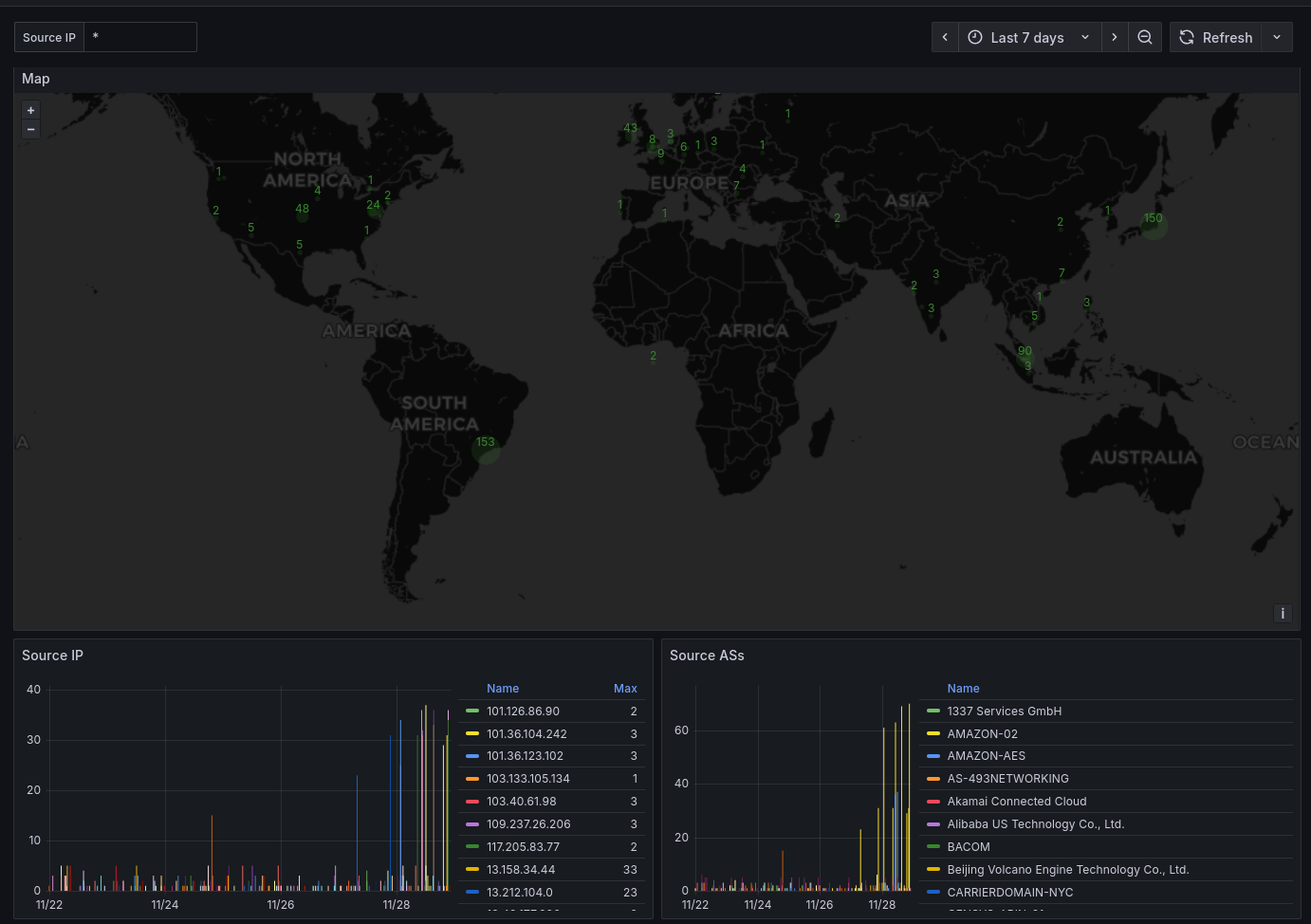
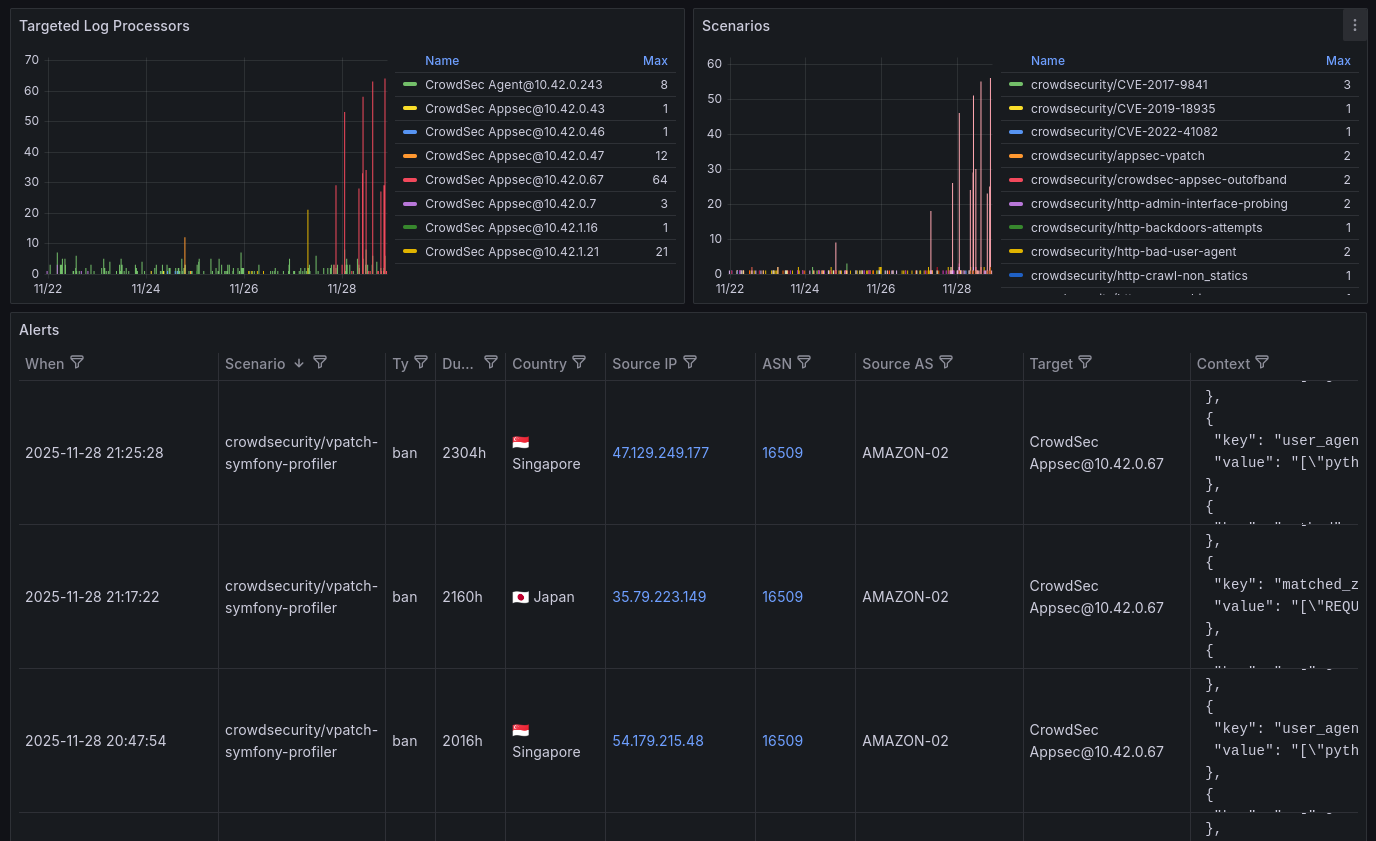
Conclusion 🔗
If you want to self-host your own Application Firewall instead of using Cloudflare, CrowdSec is a great choice. Not only it is Open Source, it is extensible and community-driven, making your infrastructure up-to-date security-wise.
By subscribing to scenarios, you don't need to maintain the rules by yourself. CrowdSec will do it for you, so you can focus on your application logic.